Port monitoring for mail, SSH, databases and any TCP service

A port monitor opens a TCP connection to a host and port, the way a client would, and closes it again. When the connection fails, you hear why: refused, no answer in time, or the name could not be found.

In practice

Where a port monitor earns its place

A port monitor fits any service that speaks TCP, from mail and SSH to message brokers and game servers, whose closed door someone would notice too late.

Mail

Mail servers on 25, 587 and 993

A mail server has several doors: 25 for mail from other servers, 587 for people sending from their mail app, 993 for reading mail. Each one can stop while the others keep working. One port monitor per door tells you which one closed, and the alert says “Connection refused or dropped” when the server refuses the connection.
Servers

Cloud servers that drop ping

Many cloud networks drop ping, so a ping monitor shows a healthy server as down. A port monitor asks a question the server does answer: does it accept a connection on 22 for SSH, or 443 for the web? It is the simplest sign of life for a server you cannot ping, and it needs no agent.

File transfer

Partners who upload at night

A partner sends files to your SFTP server every night at 02:00. When an evening firewall change closes port 22 by mistake, a port monitor sees it at its next check, and the alert goes out once the retry confirms it. You hear about it hours before the partner's upload fails, not from an angry call in the morning.

Games

Game servers that use TCP

A Minecraft Java server listens on TCP port 25565 by default. A port monitor shows whether it takes connections, and its chart shows how long a connection takes, from the last hour to 30 days, with the average, the fastest, the slowest and the 95th percentile. Game servers that speak UDP, such as Bedrock or Source servers, need a UDP monitor instead.

Networks

Seen from outside, like your users

From inside your network everything works, so you cannot see the problem: a provider's route change or an upstream firewall shuts out the rest of the internet. A port monitor connects from outside, as your users do. When the incident opens, the route to the host is traced and kept with it, so you can show your provider the last hop that answered.

Devices

Message brokers for sensors

Sensors and devices often send their data to an MQTT broker on port 1883, or 8883 with TLS. If the broker stops taking connections, the devices go quiet one by one. A port monitor on the broker opens an incident each time that happens, and the monitor page shows its uptime for the last 24 hours, 7, 30 and 365 days.

What is included

Any TCP port

From 1 to 65535: mail on 25 or 587, IMAP, SSH, a database, a game server or your own service.

Nothing is sent

We open the connection and close it at once, without sending a byte. The service sees a short visit and nothing else.

The reason in every alert

“Connection refused or dropped”, “No answer in time”, “Address not found (DNS)” or “Address leads to a private network”.

Connection time

Each check records how long the name lookup and the connection took, with charts from the last hour to 30 days.

Checked again before you hear

A failed connection is tried again, and from other regions, before an incident opens.

For UDP, a UDP monitor

Services that use UDP, such as DNS, NTP or game servers, have no connection to open: a UDP monitor sends a request and waits for the answer.

In the dashboard

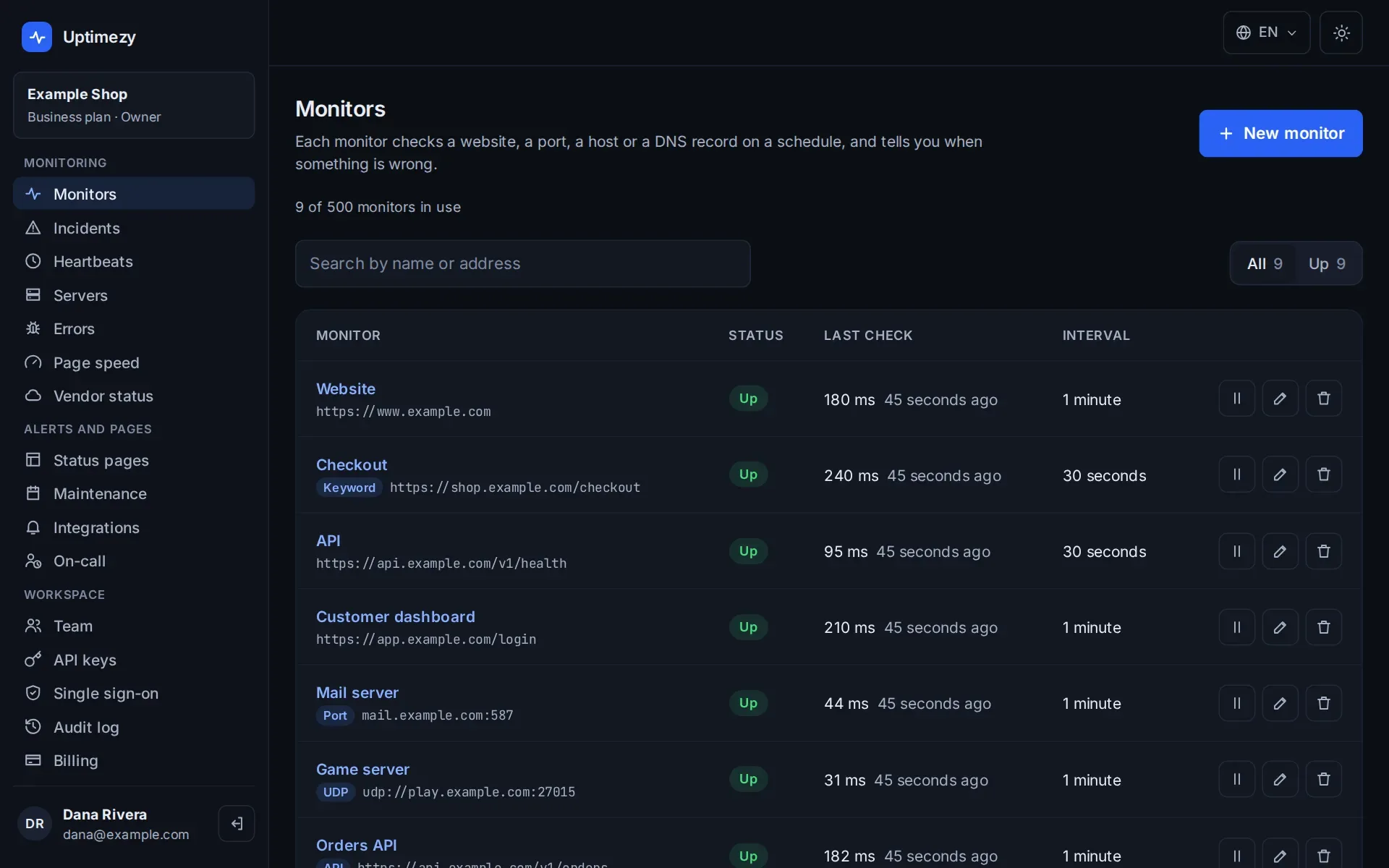
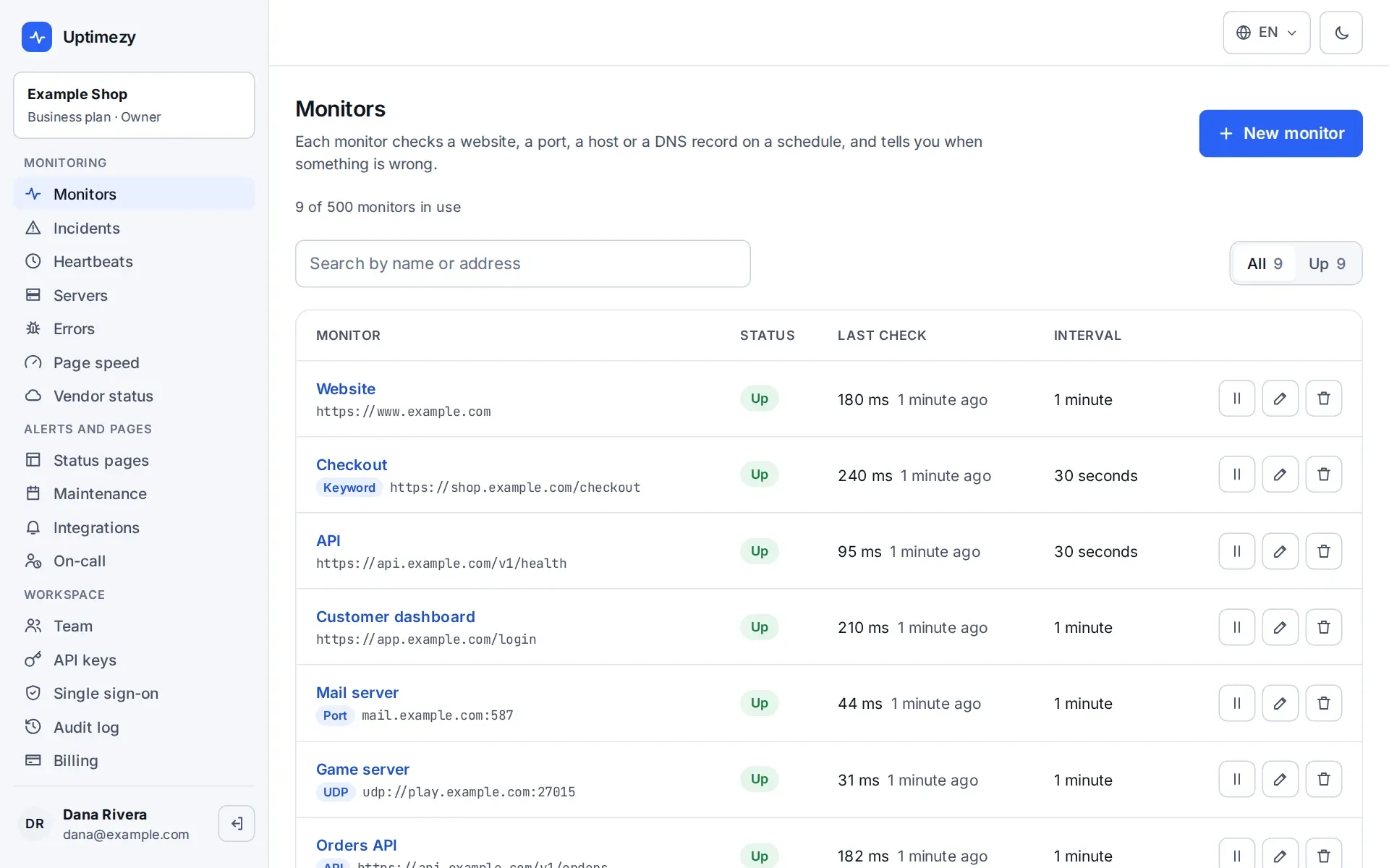
A screen from the dashboard, with example data.

The Monitors page: nine monitors of different types, all up, with their response times and check intervals.The Monitors page: nine monitors of different types, all up, with their response times and check intervals.

How it works

  1. Step 1

    Add the host and port

    Type the host and the port, and choose Port as the type.

  2. Step 2

    We connect

    Regions take turns opening a connection, at the interval you chose.

  3. Step 3

    Hear why it failed

    When regions agree that the port does not answer, the alert names the reason.

The full guide

Port monitoring, explained

Eight short chapters, from what a connection proves to the limits of the check. Each one opens in place, so the page stays short.

01What a port check proves, and what it does not

A port monitor asks one question: does this host take a TCP connection on this port? We open the connection the way a client would and close it at once, without sending a byte. If it opens within the time limit, the port is up.

Read moreShow less

That makes it the lightest check for any service that speaks TCP: mail, SSH, a database, a message broker, a game server or your own program. The service sees a short visit and nothing else, so the check works whatever protocol it speaks.

  • It does not see whether the service answers correctly. A program that accepts connections but is stuck inside still counts as up.
  • It does not test TLS. The connection is closed before any TLS starts, so an expired certificate on port 993 or 8883 goes unnoticed.
  • It does not reach UDP services, which have no connection to open. Use a UDP monitor for them.

When the answer itself matters, a database monitor signs in and runs a query, and an API monitor reads what a web service returns.

02Refused, silent or not found: reading the reason

A failed connection always comes with a reason, and the reason tells you where to look. The two most common ones mean very different things.

Read moreShow less
ReasonWhat happenedWhere to look
Connection refused or droppedSomething answered the attempt with a refusal, or cut the connection.Usually the host is up, and the service is stopped or listens on another port, or a firewall rejects us. A router that reports the host as unreachable gives this reason too.
No answer in timeNothing answered within the Timeout.A firewall that drops packets in silence, a host that is off, or a broken route.
Address not found (DNS)The name could not be looked up.The domain's DNS records or its name servers.
Address leads to a private networkThe name now leads to a private address.A DNS change that points the name inside a network.

One failed connection sends nothing. The same place connects again 30 seconds later, or at the next check when the interval is shorter, and other places vote when we run checks from more than one; fewer false alarms explains the rules. When the incident opens, the route to the host is traced by itself and kept with it, under Route when it opened.

03Which port to watch

Watch the port that your users or other servers really connect to. A service often listens on several ports, and each one can fail alone, so one monitor per port tells you which door closed.

Read moreShow less
ServiceUsual portsGood to know
Mail between servers25Other mail servers deliver here.
Sending from a mail app587, 465People's mail apps send here.
Reading mail (IMAP, POP3)993, 995These use TLS, which the check does not test.
SSH and SFTP22A good sign of life for servers that drop ping.
PostgreSQL, MySQL, MariaDB5432, 3306A database monitor can also run a query.
MQTT for devices1883, 88838883 is the TLS port.
Remote desktop3389Only if it is open to the internet on purpose.

04Setting up a port monitor

A port monitor takes a minute to add. Try the port with the free check first, so the monitor is not down from its very first check.

Read moreShow less
  1. Try the host and port with the free check. If the connection fails there, it will most likely fail in the monitor too.
  2. In the dashboard, open Monitors and choose New monitor.
  3. Under What to check, choose Port.
  4. Type the Host, a name such as mail.example.com or a public address, without https://, and the Port.
  5. Give it a Name that says which service it is, such as “mail-imap”: alerts show it next to the host and port.
  6. Choose the Check interval and the Timeout, then press Create monitor.

A port monitor on a host name also watches the domain's registration, when the registry publishes its end date: Domain warning warns you before it ends, 30 days ahead unless you choose otherwise.

05What the connection time tells you

Each check that passes records how long it took, from the start of the check until the connection opened. Looking up the name is part of that time, and so is the network between the place that checks and your host.

Read moreShow less

Opening a TCP connection takes one round trip, so on a healthy host the number stays close to the network distance and changes little. A sudden climb usually points at the network, or at a host so busy that it is slow to accept new connections.

The monitor page shows the Response time chart for the last hour, 6 hours, 24 hours, 7 days or 30 days, with the Average, Fastest, Slowest and P95 of the checks that passed. When more than one place checked the monitor in the last 24 hours, you can show one place at a time.

06Port, UDP, database or website monitor?

Each of these checks answers a different question. Choose by what must keep working, not by what is easiest to add.

Read moreShow less
MonitorIt asksIt is up when
PortDoes the service take connections?A TCP connection opens in time
UDPDoes a UDP service answer?An answer to our request arrives in time
DatabaseDoes the database work?We sign in, a read-only query runs, and any checks you set on its first row and its time pass
WebsiteDoes the site answer as it should?The page comes back with the expected status code

Many teams pair them: a port monitor on every service a host offers, and a database or website monitor on the one whose failure costs the most. A ping monitor asks the question that comes before all of them: is the host there at all?

07Letting our checks in

A port monitor connects from the places we run checks from, like any client on the internet. If your firewall lets only known addresses in, our checks must be among them.

Read moreShow less
  • Let in TCP to the port you watch. The check connects and sends nothing, so it needs no other rights.
  • Let in every place we run checks from, not just one: when there are several, they take turns, and others check again before a status changes. Let our checks through a firewall says where to find their addresses.
  • A tool that blocks addresses after many short connections may block ours. Let our checks through it, or choose a longer interval.

Only public hosts can be checked. Private addresses such as 10.0.0.5, and names that only exist inside a network such as db.internal, are refused when you save. The address is checked again at every connection, after the name is looked up, so a name that later points inside a network fails with Address leads to a private network.

08Where a port monitor stops

A port monitor is a narrow tool on purpose. Knowing where it stops keeps it from giving you false comfort.

Read moreShow less
  • No reverse check. A port monitor is up when the connection opens; it cannot tell you that a port which should be closed is open.
  • No TLS and no certificate. Certificate warnings come with website, keyword and API monitors on https:// addresses.
  • No look at the answer. A greeting such as a mail server's banner is never read.
  • TCP only. For DNS, NTP, UDP game servers such as Bedrock or Source, and other UDP services, use a UDP monitor.
  • No choice between IPv4 and IPv6. The name is looked up and connected to the way the system does it; to test one of them, type that address as the host.
  • Public hosts only: a port on a machine inside your network cannot be checked. The server agent can watch such a machine's CPU, memory and disks from the inside. It reports over HTTPS and opens no port, but it does not check ports.

Common questions

Does it check what the service answers?

No, only that the connection opens. For a website or an API, use a website or API monitor; for PostgreSQL, MySQL or MariaDB, a database monitor runs a real query.

Can I check a port on a private network?

No. Checks reach public addresses only, and private addresses are refused when you save the monitor.

Can it tell me when a port that should be closed is open?

No. A port monitor is up when the connection opens, and there is no setting that turns it around.

Does it check the certificate on a TLS port such as 993?

No. The check closes the connection before any TLS starts, so an expired certificate on such a port goes unnoticed. Certificate warnings come with website, keyword and API monitors on HTTPS addresses.

Can I try a port before I add a monitor?

Yes. The free check on our website opens a connection to a host and port from our servers, without an account.

Can I add port monitors through the API?

Yes. Create a monitor of the type port with its host and port through the REST API, or ask an AI assistant connected over MCP to do it.

More features

All features

Check what your API answers, not only that it answers.

Learn more: API monitoring

Know when a DNS record disappears or loses the value you expect.

Learn more: DNS monitoring

Know when a UDP service stops answering.

Learn more: UDP monitoring

Add your first monitor in two minutes

Free plan. No credit card needed.