Database monitoring for PostgreSQL, MySQL and MariaDB

A database monitor signs in to your database, runs a read-only query and checks the first row of the answer. It finds what a port check cannot: a refused password, a query that fails, a queue that grows or a replica that falls behind.

In practice

Where a database monitor earns its place

A database monitor fits wherever the database can be up and still wrong: refusing a user, failing a query, or holding numbers that say something broke.

Jobs

Background jobs that fail quietly

Jobs that fail often leave only a row in a table. In PostgreSQL, a query such as SELECT count(*) AS failed FROM jobs WHERE failed_at > now() - interval '1 hour', with a check that failed is less than 1, turns those rows into an alert. The alert gives the number of the check that failed, and nothing of the table is stored.

Replicas

A replica that falls behind

A PostgreSQL replica can stop replaying changes while it still answers every query. Ask it how many seconds it is behind, as lag_seconds, and check that the number is less than 60. Count 0 when it has replayed everything it received, or a quiet primary looks like lag. Point the monitor at the replica itself: on a primary the query gives null, and the check fails.

Sign-in

A password that was changed

Someone rotates a password or removes a user, and the port still accepts connections. A database monitor signs in with its own user and password: when that password changes or that user is removed, it fails with “The database refused the user, the password or the database”. To catch a change to the application's user, let the monitor sign in as that user. When you change the password on purpose, type the new one in the monitor too.

Locks

Queries that hang

A long lock or an overloaded server makes queries wait while connections still open. The check waits too, up to the monitor's timeout, then fails with “No answer in time”. The database is also given a time limit for the query, so the query stops shortly after the check ends instead of running on.

Speed

A database that gets slow at night

Backups and batch work often make a database slow for an hour each night. The chart of the check's time shows when, and how slow. Set a slowest allowed response, such as 500 ms, and a slower check fails with “The response came too slowly” instead of only showing on the chart. The time covers the whole check, signing in included.

Sales

Orders that stopped coming in

A broken checkout often throws no error at all: orders simply stop. A query that counts the orders of the last two hours, with a check that the count is greater than 0, notices. In MySQL with no database chosen, name the table as database.table. Choose a window long enough for your quietest hours.

What is included

PostgreSQL, MySQL and MariaDB

Your host and port (5432 or 3306 by default), the database, a user and a password.

Always encrypted

The connection always uses TLS: with the certificate verified, the default, or without checking a self-signed certificate. Never unencrypted.

Read only

The query runs read-only, as one statement, with a time limit on the database too, so a check never changes data and never leaves a query running.

Checks on the first row

Compare columns of the first row with a value: equals, contains, less than, greater than and more. Add the longest time the whole check may take: connecting, signing in and the query.

The password stays secret

It is stored encrypted and never shown again, and it is sent only to the server it was saved for.

The reason in every alert

“The database refused the user, the password or the database”, “The query did not run”, “No answer in time” or a certificate problem.

In the dashboard

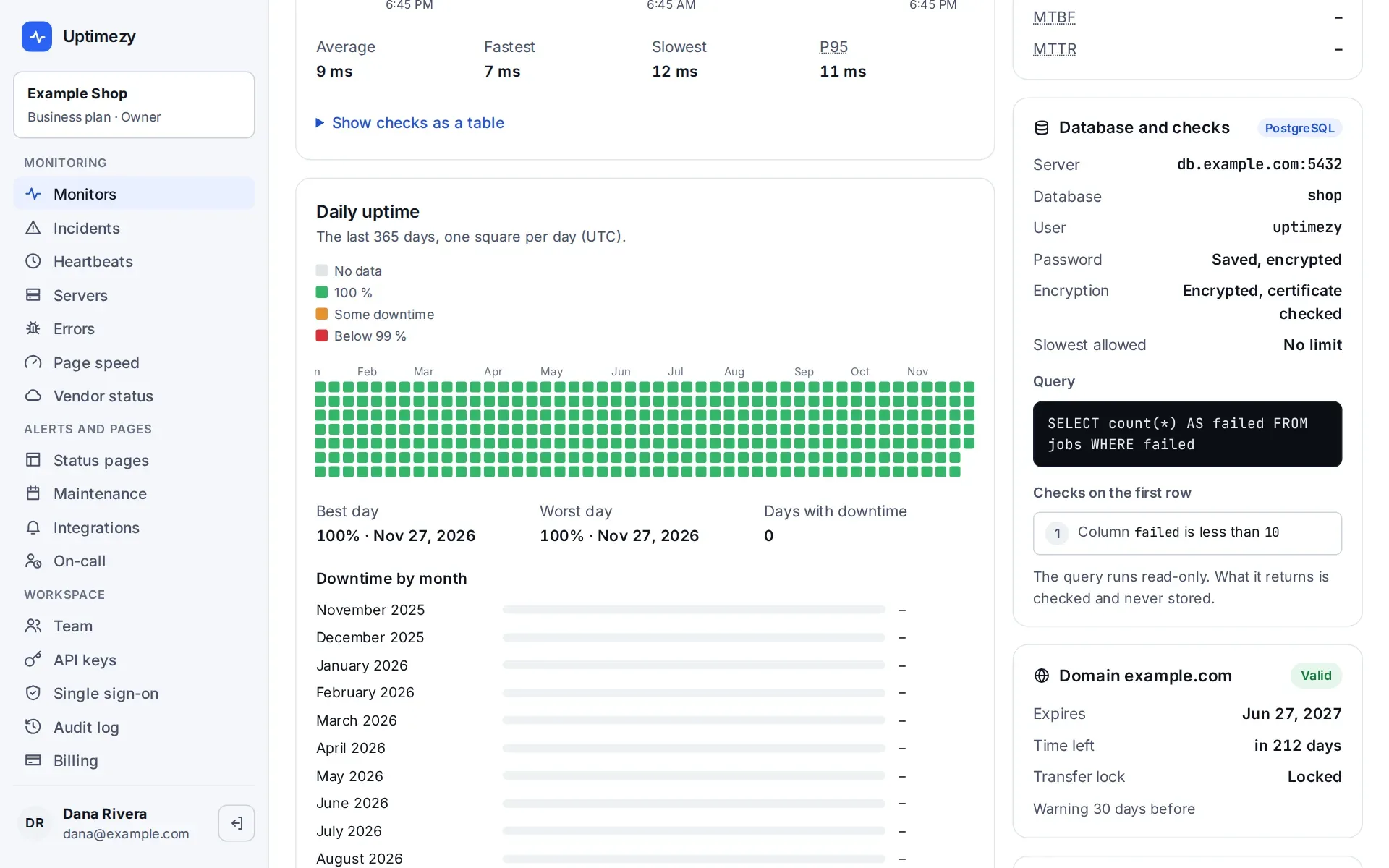
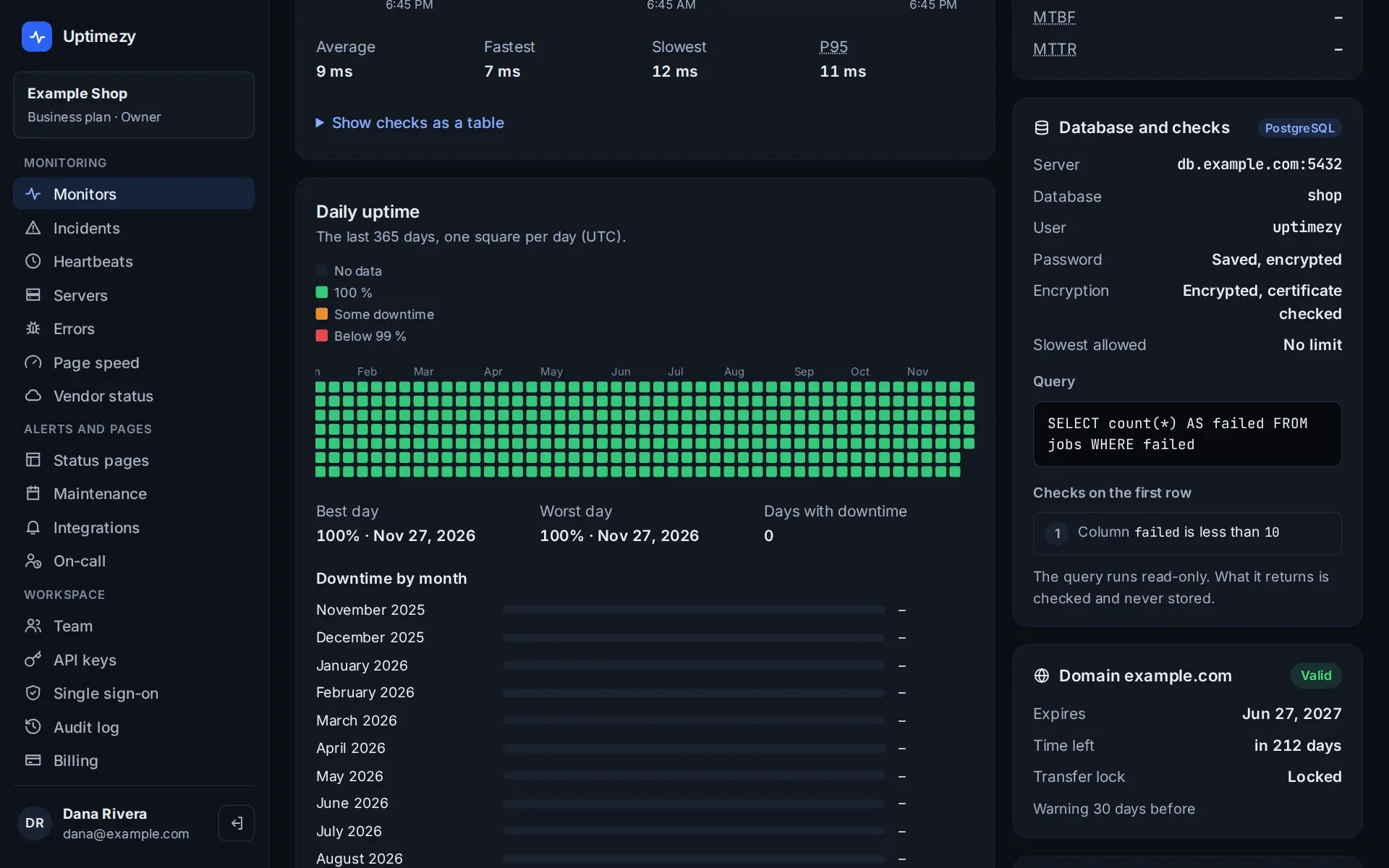
A screen from the dashboard, with example data.

A database monitor's page: where it signs in, the query it runs and the check on the first row.A database monitor's page: where it signs in, the query it runs and the check on the first row.

How it works

  1. Connect

    The engine, the host, the database, a user and its password.

  2. Write the query

    Such as SELECT count(*) FROM jobs WHERE failed, and what the answer must be.

  3. Let our checks in

    The form shows the addresses our checks come from, to allow in your firewall.

The full guide

Database monitoring, explained

Eight chapters on preparing your database, writing the query and reading what fails. Each one opens in place.

01What a query finds that a port check misses

A port monitor on 5432 or 3306 only proves that something accepts connections. Most database trouble happens after that: at sign-in, in the query, or in the data. A database monitor goes all the way to the first row.

Read moreShow less
What went wrongPort monitorDatabase monitor
The server stoppedFailsFails: “Connection refused or dropped” or “No answer in time”
The password changed or the user is gonePasses“The database refused the user, the password or the database”
The database was renamed or droppedPasses“The database refused the user, the password or the database”
A table is gone, or the user lost its rightsPasses“The query did not run”
Queries hang behind a lock or a busy serverPasses“No answer in time”, and the server stops the query soon after
Failed jobs pile up in a tablePasses“A response check failed”, with a check on a count

A port monitor is still worth keeping beside it: it is light, and it runs from every place we run checks from, while database checks run from our main server only.

02Preparing the database side

A check signs in from the internet, over TLS, as a user you create for it. Four things on your side make that work, and the database monitors guide has the exact commands.

Read moreShow less
  1. Turn on TLS. A connection without it is never made, and the check fails with “Certificate or secure connection problem”.
  2. Create a user for the monitor that may only read what the query needs. The query runs read-only anyway, but a user that cannot write is safer.
  3. Let our checks in. The monitor form lists the addresses our checks come from: allow them in the database's firewall and, for PostgreSQL, in pg_hba.conf with a hostssl line. See letting our checks through a firewall.
  4. Use a public address. A host that leads to a private network is refused with “Address leads to a private network”.

03How one check runs

Every check opens a new connection, does one thing and drops it. All of it, connecting included, must fit within the monitor's Timeout.

Read moreShow less
  1. Look up the host and connect over TCP to its public address, on the port you gave.
  2. Start TLS 1.2 or newer, and check the certificate unless you chose Encrypted, certificate not checked.
  3. Sign in. PostgreSQL proves the password with SCRAM-SHA-256 or MD5, never in clear text. For MySQL and MariaDB, clear-text passwords and the old password hashing are refused.
  4. Start a read-only transaction and give the server a time limit for the query, the time left for the check: statement_timeout in PostgreSQL, max_execution_time in MySQL, max_statement_time in MariaDB. The query stops shortly after the check ends.
  5. Run your query as one statement and read the first row, up to 20 columns.
  6. Drop the connection without reading the rest, judge the row, and forget it.

04Queries that make good checks

A good check query returns one row with a few named numbers, and you add a check on each. It should be cheap, because it runs at every interval.

Read moreShow less
To watchQueryCheck
Signing in worksSELECT 1, the defaultNone needed
Failed jobs, PostgreSQLSELECT count(*) AS failed FROM jobs WHERE failed_at > now() - interval '1 hour'failed is less than 1
Failed jobs, MySQL or MariaDBSELECT count(*) AS failed FROM shop.jobs WHERE failed_at > NOW() - INTERVAL 1 HOURfailed is less than 1
A PostgreSQL replica's lagSELECT CASE WHEN pg_last_wal_receive_lsn() = pg_last_wal_replay_lsn() THEN 0 ELSE EXTRACT(EPOCH FROM now() - pg_last_xact_replay_timestamp()) END AS lag_secondslag_seconds is less than 60
Fresh data, PostgreSQLSELECT EXTRACT(EPOCH FROM now() - max(imported_at)) AS age_seconds FROM importsage_seconds is less than 93600
Orders still coming in, PostgreSQLSELECT count(*) AS orders FROM orders WHERE created_at > now() - interval '2 hours'orders is greater than 0
  • Name every column with AS. Without it, PostgreSQL calls count(*) count, and MySQL calls it count(*).
  • Turn dates into seconds in the query. A date arrives as text, which is less than cannot compare; a number of seconds it can.
  • On a primary server, the replica query gives null and the check fails: point that monitor at the replica. The query counts 0 when the replica has replayed everything it received, so a quiet primary does not look like lag.
  • In MySQL with an empty Database, write tables as database.table.

05How the first row is read

Only the first row counts, and each check reads one of its columns by name. How a value arrives decides which comparisons make sense.

Read moreShow less
In the databaseThe check sees
Integers, decimals and floatsA number, so is less than 10 works
TextText, cut after 500 characters, compared exactly, upper and lower case included
true and false in PostgreSQLThe words true and false. MySQL's booleans are numbers, 1 and 0
NULLnull: it exists, but it is not a number
Dates and timesText, such as 2026-11-24T09:00:00Z from PostgreSQL
  • A query that returns no row passes when there are no checks. With checks, only does not exist can pass.
  • Only the first 20 columns are read. When two columns have the same name, the first one counts.
  • Use ORDER BY when more than one row can come back: without it, the database decides which row is first.
  • The comparisons are those of API monitors, with up to 10 checks. The alert gives the number of the first one that fails.

06Encryption and the saved password

Every connection is encrypted; you only choose whether the certificate is checked. The password is a secret we can use but never show.

Read moreShow less
SettingWhat it means
Encrypted, certificate checkedThe default. The certificate must be signed by a known authority and be for the host name you typed
Encrypted, certificate not checkedStill encrypted, but anyone could be at the other end. Only for a self-signed certificate
  • The password is stored encrypted and never shown again. The monitor's page says Saved, encrypted, and the edit form keeps it when you leave the field empty.
  • Change the engine, the host, the port, the user or the encryption, and the password must be typed again: a saved password goes only to the server it was typed for.
  • The password is not in alerts or lists. A database monitor is named there by its engine, host and port, such as postgres://db.example.com:5432.

07When a database monitor goes down

Database checks run from our main server only, because the database drivers and your password stay there. So the rule before an alert is simpler than for other monitors: two failures in a row, from the same place.

Read moreShow less
ReasonUsually means
“The database refused the user, the password or the database”A wrong password, an unknown user or database, or a server that wants the password in clear text
“The query did not run”A mistake in the query, two statements, a write, a missing table or a missing right
“No answer in time”The check did not end within the Timeout. A firewall that silently drops our connection also gives this. If the query was running, the server is told to stop it
“Certificate or secure connection problem”No TLS on the server, or a certificate that did not pass the check
“Connection refused or dropped”The connection was refused or dropped, often by a firewall that does not know our addresses
“A response check failed”One of your checks on the first row did not pass

After a failed check, the monitor is checked again 30 seconds later, or at the next check when the interval is shorter. The second failure in a row makes it Down, opens an incident and sends the alert. Other places do not confirm it.

Alerts go by email, to webhooks and to 9 chat apps, with escalation when nobody acknowledges.
08What a check does to your database

A check is one short visit: a new connection, one read-only query, and gone. You can see it come, and you decide how often it comes.

Read moreShow less
  • A new connection for each check, dropped right after the first row. Nothing stays open between checks.
  • In PostgreSQL, our connection shows Uptimezy as its application_name in pg_stat_activity.
  • The query runs in a read-only transaction with a time limit on the server, so a slow query stops soon after the check ends.
  • The Check interval sets how often it comes: every minute means 1,440 visits a day. A query that uses an index keeps each visit small.

What the query returns is checked and then forgotten. We keep the reason, the time the check took and which check failed, never a value from your tables.

Common questions

From where do database checks run?

From our main server only, so there are few addresses to allow. They are not confirmed from other regions.

Which rights should the user have?

Only reading what the query needs. The check runs read-only anyway, but a user that cannot write is safer.

Can it check SQL Server, Oracle, MongoDB or Redis?

No. Database monitors sign in to PostgreSQL, MySQL and MariaDB only. For another database, a port monitor shows whether it still accepts connections.

Can it check a database in a private network?

No. The host must have a public address that our main server can reach over TLS. A host that leads to a private address is refused, and SSH tunnels are not supported.

Is what the query returns stored?

No. The first row is checked and then forgotten. We keep the reason, the time the check took and the number of the check that failed, never a value from your tables.

Can I create database monitors through the API?

Yes, through the REST API with a key that has the monitors:create permission. The password is sent once and never returned. AI assistants cannot create database monitors, because of the password.

More features

All features

Hear about the job that did not run.

Learn more: Cron job heartbeats

See inside every server you run.

Learn more: Server monitoring

Hear when a service you depend on has trouble.

Learn more: Third-party status

Add your first monitor in two minutes

Free plan. No credit card needed.