Multi-location monitoring: checks from several regions

Checks run from several regions in turn, so you see your site the way customers in different places do, and a problem in one network is never mistaken for an outage.

01

Every region sees your site

Checks rotate through Frankfurt, New York, and Singapore, one region per check. Your server gets one request per interval, and each region sees it often enough that a slow route or a blocked network shows up in its own results.

02

A problem in one network is not an outage

Before a monitor goes down, up to two other regions check again at the same moment. If they reach your site, it stays up, nobody is alerted, and the count of failures starts again.

03

When it is down, you know where

An outage that most regions confirm opens an incident. It keeps what each region saw and the route to your host from each one, and the alert says where the outage was confirmed.

In practice

Where more than one place pays off

Everyday cases where checking from several places changes what you see, and where your own setup has to let every place in.

Speed

Did the CDN help far from home?

Before and after you put a CDN in front of your site, compare the “Checked from” card: each place's average time over the last 24 hours, fastest first, with its share of passed checks. The list above the response chart shows one place's curve alone, so you see whether the places far from your server got faster, not only the average.
Recovery

Back up only when most places agree

After a fix, when other places check too, the first place that reaches your site again does not end the incident alone. Other places check at the same moment, and the monitor is up only when more than half of the places that answered reach it. A DNS change still on its way, or a firewall rule fixed for one network only, keeps the incident open.

Firewall

An allowlist that forgets a place

If your firewall lets in only some of the places we check from, the others fail when it is their turn. Their quick retries fail too, and when most places in the vote are blocked, the one that failed included, an incident opens although the site works. Let every place in: the firewall guide shows where we list our check addresses.

Our side

When a probe goes quiet

A probe can lose its own network too. When the place whose turn it is does not answer within the check's time limit plus 10 seconds, our main server makes the check instead, and that result counts. A probe that stays silent while others confirm a change is left out of the vote, so it never decides your monitor's status.

Routes

The route from every place at once

On a monitor's page, “Trace route” runs from every place at the same moment and lists each hop with its time, within 20 seconds; routers on private networks are not named. When an incident opens, the route is traced from every place by itself and kept with the incident for 30 days, except for DNS monitors.

Monitor types

Each type checks from where it can

Website, keyword, port and DNS monitors are checked from every place. Ping uses the places that can send pings, and API and UDP checks go to the main server and the probes that can make them. Database monitors are checked from our main server only, where the drivers and the password stay, so a database firewall needs to let in that one server.

What is included

Regions take turns

Each check runs from the next region, so every region sees your site regularly without all of them asking at once.

Confirmed elsewhere

A result that would change a monitor's status is checked again from up to two other regions at the same moment, and the status changes only when most agree.

Results per region

The last check shows where it ran, by city and country. A card shows each region's checks of the last day, and the response time charts can show one region.

What each region saw

An incident records which regions saw the failure, and usually the route to the host from each region, traced when it opened.

A lost region is replaced

If a region does not answer in time, our main server makes the check instead. A region that does not answer never makes your site look down.

Nothing to set up

Website, keyword, port, DNS, API and UDP monitors use every region, and ping uses the regions that can send pings. Database checks run from our main server.

In the dashboard

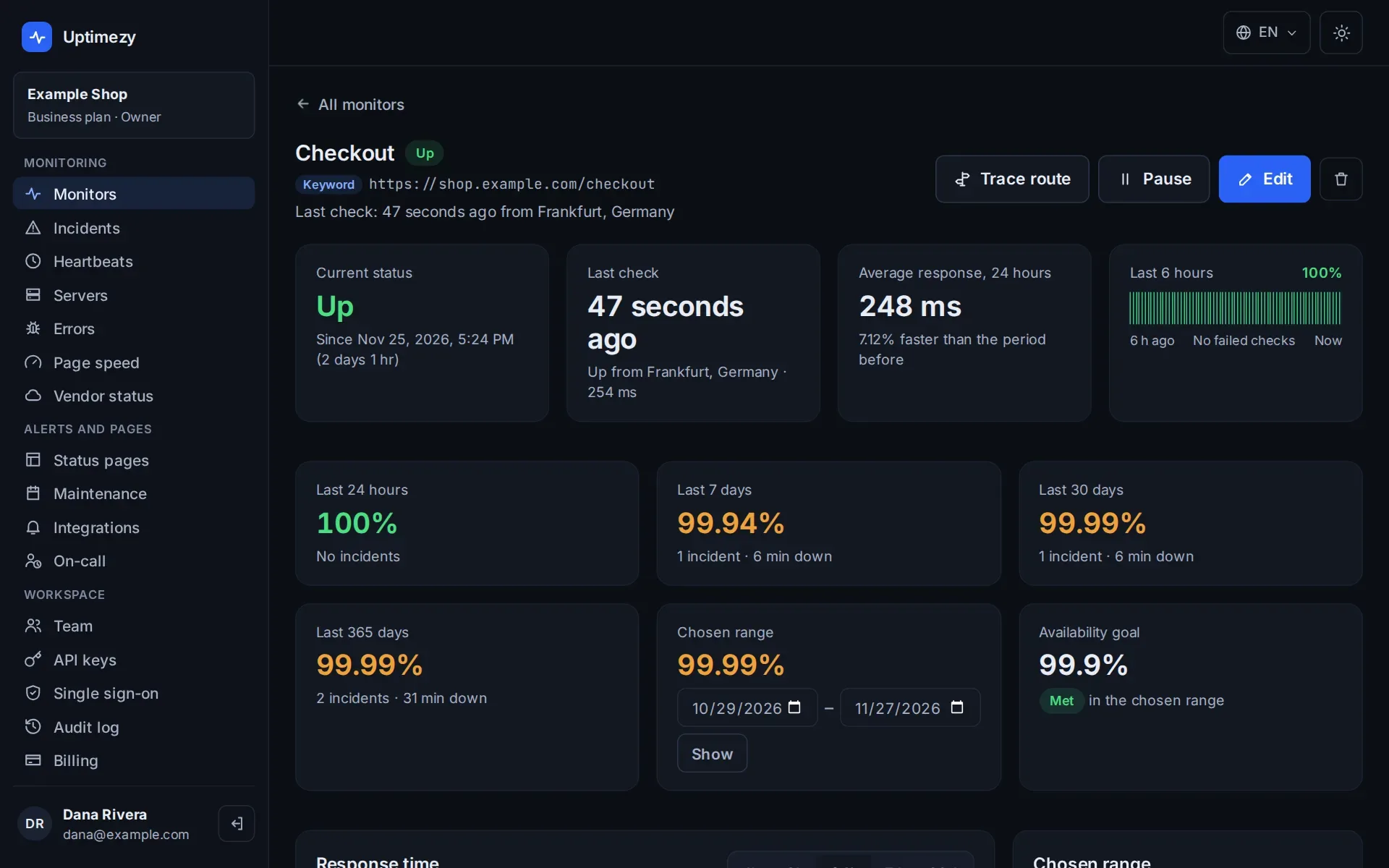
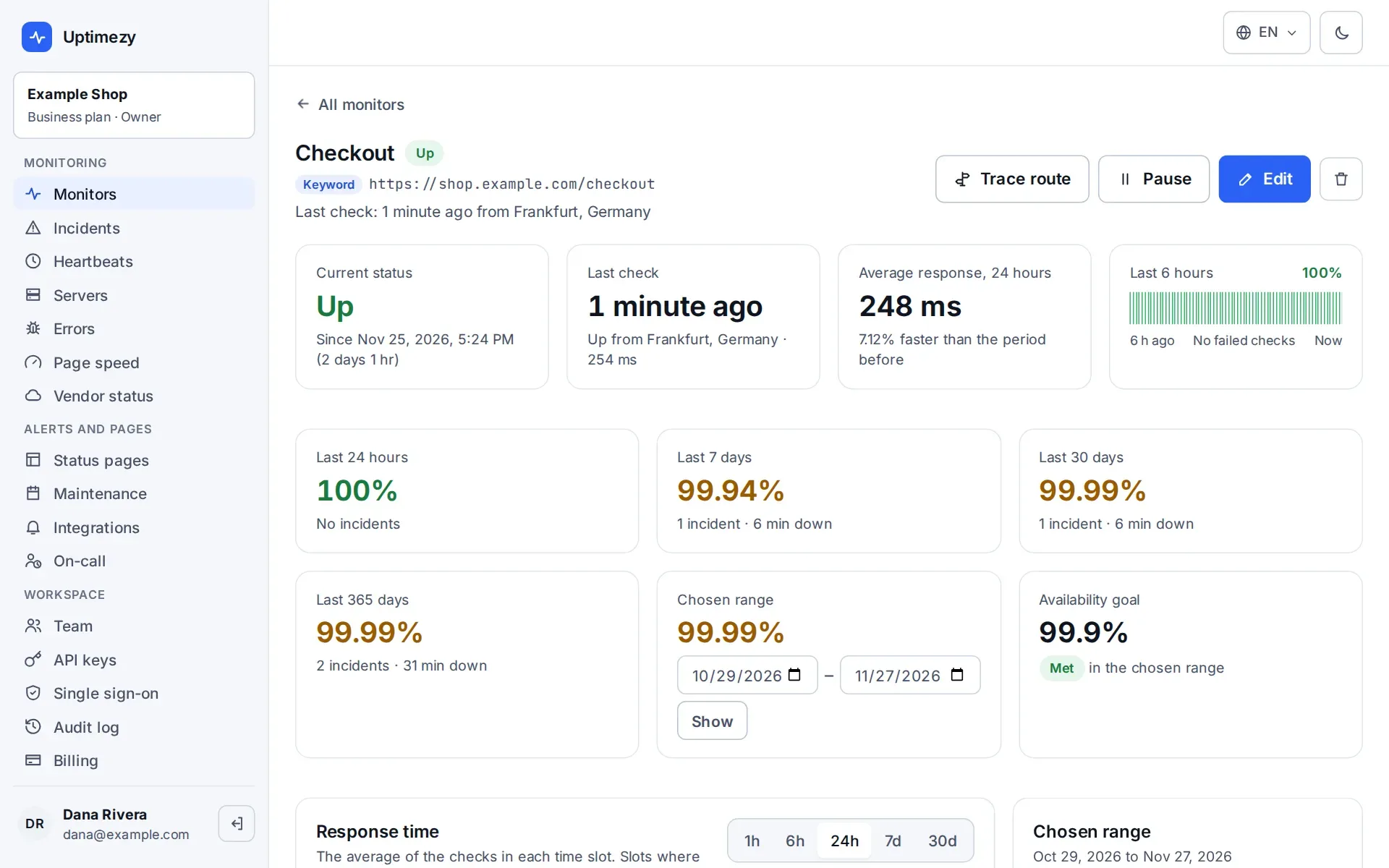
A screen from the dashboard, with example data.

A monitor's page: its status, response time and uptime over 24 hours, 7, 30 and 365 days, with an SLA goal that is met.A monitor's page: its status, response time and uptime over 24 hours, 7, 30 and 365 days, with an SLA goal that is met.

How it works

  1. Step 1

    Add a monitor

    Any type, on any plan.

  2. Step 2

    Regions take turns

    Each check comes from the next region.

  3. Step 3

    Agreement before alerts

    Most regions must agree before a status changes.

The full guide

Checks from several places, explained

Each chapter opens in place, so the page stays short.

01The places we check from

Checks run from the places we run checks from: our main server, and probes that our staff add on servers in other places. A probe is a small program that only connects out to our main server, takes checks and sends back what it found.

Read moreShow less
  • A probe counts as online when it asked for work within the last minute. Only online probes get checks.
  • You see each place by its city and country, and the main server as “Main server” when it has no city name. A probe's own name or ID never shows.
  • No plan limits the places, and there is no setting per monitor: every monitor uses the places that can make its kind of check.
  • With a single place, everything works the same: its result stands on its own, and the list of places above the response chart and the place names in alerts appear only when more than one place checked.

02How often each place sees your site

Each check runs from one place, and the places take turns from one interval to the next. Monitors also start at different places, so your monitors are spread over all of them.

Read moreShow less

With two places and a one-minute interval, each place checks your site about every two minutes; with three places and a five-minute interval, about every fifteen. Your server still gets one regular check per interval.

A quick retry is the exception: after a first failed check, the next check comes from the same place, 30 seconds later or at the next interval when that is sooner. The same place asks twice before any other place is asked.

The checks that confirm a change are extra. They are not stored as checks of their own and do not count in a place's results; when an incident opens, what they saw is kept with it.

03Which results get a second opinion

Most checks stand on their own. Only a result that would change the monitor's status is checked again from other places, at the same moment.

Read moreShow less
  • The failure that would make the monitor down: the second failed check in a row, after the quick retry.
  • A passed check while the monitor is down, which would bring it back up.

Up to two other places check at once, and the status changes only when more than half of the places that answered saw the same thing as the first. A tie leaves the status as it was.

Places that answeredSaw it downWhat happens
33 or 2Down: an incident opens
31Up: no incident, and the count of failures starts again
22Down: an incident opens
21A tie: the monitor stays up
11Down: a single place agrees with itself

04Coming back up is a vote too

When other places check too, an incident does not end because one place reached your site again. The passed check is confirmed like a failure, and the monitor is up only when most places that answered agree.

Read moreShow less

If the others still see your site down, the passed check does not count: the monitor stays down and the incident stays open. The next check, from the next place in turn, tries again. When most places agree that the site is back, the incident ends and the “back up” message goes out.

So a site that answers in one network but not yet in the others is not reported back too early: after a DNS change that is still on its way, for example, or a firewall rule fixed for one network only.

An incident runs from its first failed check to the passed check that most places confirmed, so the downtime on the monitor page follows what most places saw.

05Reading the results place by place

The monitor page shows where the last check came from and how each place sees your site. Views that compare places appear only when more than one place checked in the last 24 hours.

Read moreShow less
  • The last check names its place: up with its time, or down with the reason.
  • Checked from lists the places of the last 24 hours, fastest first: whether each one's last check passed, its average time, its share of passed checks and when it last checked.
  • The list above the response chart shows All places, or the checks of one place you choose.
  • An incident names the places that saw the monitor down, and the alert email lists the places that confirmed it.
  • Route when it opened shows the route from each place, traced when the incident opened.

06Places in the API, webhooks and assistants

Most of what the dashboard shows about places is in the data too; the routes traced from each place stay in the dashboard. Your own tools can compare places without reading a page.

Read moreShow less
  • A monitor's report lists the newest checks of the last 24 hours, at most 500, each with its place, and a places summary of the whole 24 hours: the checks, passed checks, average time and last result of each place.
  • Response times take a place filter: main for the main server, or a probe's country code and city.
  • Each incident has places: what each place in the vote saw when it opened, with ok, the reason, the status code and the time the check took.
  • An incident's webhook message always has places.
  • An AI assistant reads the places of a monitor's report and of each incident.

Every field is described in the API reference. For assistants, see AI assistants.

07Monitor types and their places

Every monitor uses the places that can make its kind of check. There is nothing to choose per monitor.

Read moreShow less
MonitorChecked from
Website, Keyword, Port, DNS recordEvery place
PingThe places that can send pings: the main server when it can, and the probes that can
API, UDPThe main server and the probes that make these checks
DatabaseThe main server only

Database checks stay on the main server because the database drivers and the password never leave it. A database monitor's status change has no other place to confirm it, so the quick retry from the main server is its second look.

08When a place has trouble

Places are servers too, and their networks can fail. A probe that does not answer never decides your monitor's status; one that answers with failures still votes, so with two places it can keep an incident open.

Read moreShow less
  • When the probe whose turn it is does not answer within the check's time limit plus 10 seconds, the main server makes the check instead, and its result counts.
  • A probe that does not answer while others confirm a change is left out of the vote.
  • A probe that is not online, because it has not asked for work in the last minute, gets no checks at all.

09Firewalls, allowlists and blocked countries

If something in front of your site filters visitors by address or by country, every place we check from has to get through. A blocked place fails every check it makes. When most places in a vote are blocked, the one that failed included, an incident opens although the site works, even if most of our places let checks in.

Read moreShow less
  1. Find the addresses we list for our checks: the firewall guide shows where.
  2. Let all of them in, not just one: other places check again before a status changes.
  3. If your site blocks some countries, compare them with the countries in Checked from on a monitor's page.
  4. For web checks, you can also recognise our User-Agent, which is the same from every place. See how to recognise our checks.

Common questions

Which regions check my site?

Frankfurt, New York, and Singapore. Website, keyword, port, DNS, API and UDP monitors use all of them in turn.

Can I choose the regions for a monitor?

Not yet. A monitor uses every region that can make its kind of check, in turn.

Does every region check at every interval?

No. One region checks at each interval, taking turns, so your site gets one request per interval. Others join only to confirm a change.

Is it on the Free plan?

Yes. Monitors on every plan are checked from all regions. Ping uses the regions that can send pings, and database checks run from our main server.

What happens when only one region sees a failure?

That region checks again first. If it fails again, up to two other regions check at the same moment. If most of them reach your site, the monitor stays up, nobody is alerted and no downtime is counted. The failed checks still show in that region's results.

What if one of your regions has a problem?

If a region does not answer in time, our main server makes the check instead, so a region that does not answer never makes your site look down.

Where do I see what each region saw?

The last check shows where it ran. A monitor's page has a "Checked from" card with each region's last result, share of passed checks and average time over 24 hours, and the response time chart can show one region. An incident lists the regions that saw it.

Do I need to let your checks through a firewall?

Only if your firewall blocks unknown visitors. Then let all our places in, not just one, because other regions check again before a status changes. The firewall guide shows how to find our addresses and recognise our checks.

Why does the last check say down while the monitor is up?

The last check shows its own place's result. A first failure waits for a quick retry before anything changes. And when other places reached your site at the same moment, the monitor followed most of them: it stays up and no downtime is counted.

Is a recovery confirmed by other places too?

Yes. A passed check while the monitor is down is checked again from up to two other places, and the monitor is up only when most of the places that answered reach your site.

Are the checks that confirm a change stored?

Not as checks of their own. The place card and the reports count the regular checks and the quick retries; when an incident opens, it keeps what each place in the vote saw.

Can I read the places through the API?

Yes. Every check in a monitor's report has its place, response times can be filtered by place, and each incident lists what each place in the vote saw when it opened.

Do status pages show where checks ran?

No. A status page shows each monitor under the name you give it there, with its days, never where a check ran or why it failed.

More features

All features

An alert means something is really wrong.

Learn more: False alert prevention

See where every second of a request goes.

Learn more: Response time monitoring

Uptime you can show, against the goal you promised.

Learn more: Availability and SLA

Add your first monitor in two minutes

Free plan. No credit card needed.