Heartbeat monitoring for cron jobs and background work

Backups, imports and reports fail quietly. A heartbeat turns that silence into an alert.

In practice

Where a heartbeat earns its place

A heartbeat fits any job that runs by itself and fails in silence: backups, imports, renewals, reports and workers that should never stop.

Backups

The nightly backup

A backup that stops running is usually noticed on the day you need it. Add the call after the backup with &&, so it reports only when the backup ended without an error. With the schedule 0 3 * * * and two hours of grace, a backup that has not reported by 5:00 opens an incident, and you hear about it that morning.

Hangs

A job that hangs instead of failing

An export stuck behind a lock never fails; it just never ends. Report a start with /start when the job begins: the success must then come within the grace time, or the heartbeat counts as late. With two hours of grace, a job that started at 2:00 and is still stuck at 4:00 opens an incident.

Imports

An import that knows it failed

When an import script catches its own error, it can say so: call the address with /fail and send the log in the body. The heartbeat is down at once, without waiting for the grace time, and the first 10,000 characters of the log wait on its page under “Last output”. The next success ends the incident.

Workers

A worker that should never stop

A queue worker or a sync loop runs all the time, so there is no end to report. Call the address from inside the loop about once a minute, and give the heartbeat a period of 1 minute and 5 minutes of grace. When the worker dies or freezes, the calls stop, and the heartbeat is late 6 minutes after the last one.

Certificates

Certificate renewals

Renewal jobs fail as quietly as they run, until a certificate runs out. certbot's service is Type=oneshot, so a call added as ExecStartPost runs only when the renewal succeeded. Its runs can start up to 12 hours late, so two can be almost a day apart: a period of 1 day with a few hours of grace tells you about a stopped renewal long before the end date.

Weekly

A report that runs on Mondays

Weekly jobs are the easiest to forget: a failure is noticed a week later, if at all. Give the heartbeat the schedule 0 6 * * 1 in your own time zone, so 6:00 stays 6:00 when the clocks change. The form lists the next runs as you type, so you can see that the schedule means what you think.

What is included

One line to add

Call the URL with curl, wget or any HTTP client at the end of your job.

Start, success and failure

Report when a job starts and whether it failed, to catch jobs that hang or crash.

Schedules you already use

Set a simple period or a cron expression with a time zone, plus a grace time.

Evidence included

Send the output of the job with the call. The heartbeat's page shows the last one under “Last output”.

In the dashboard

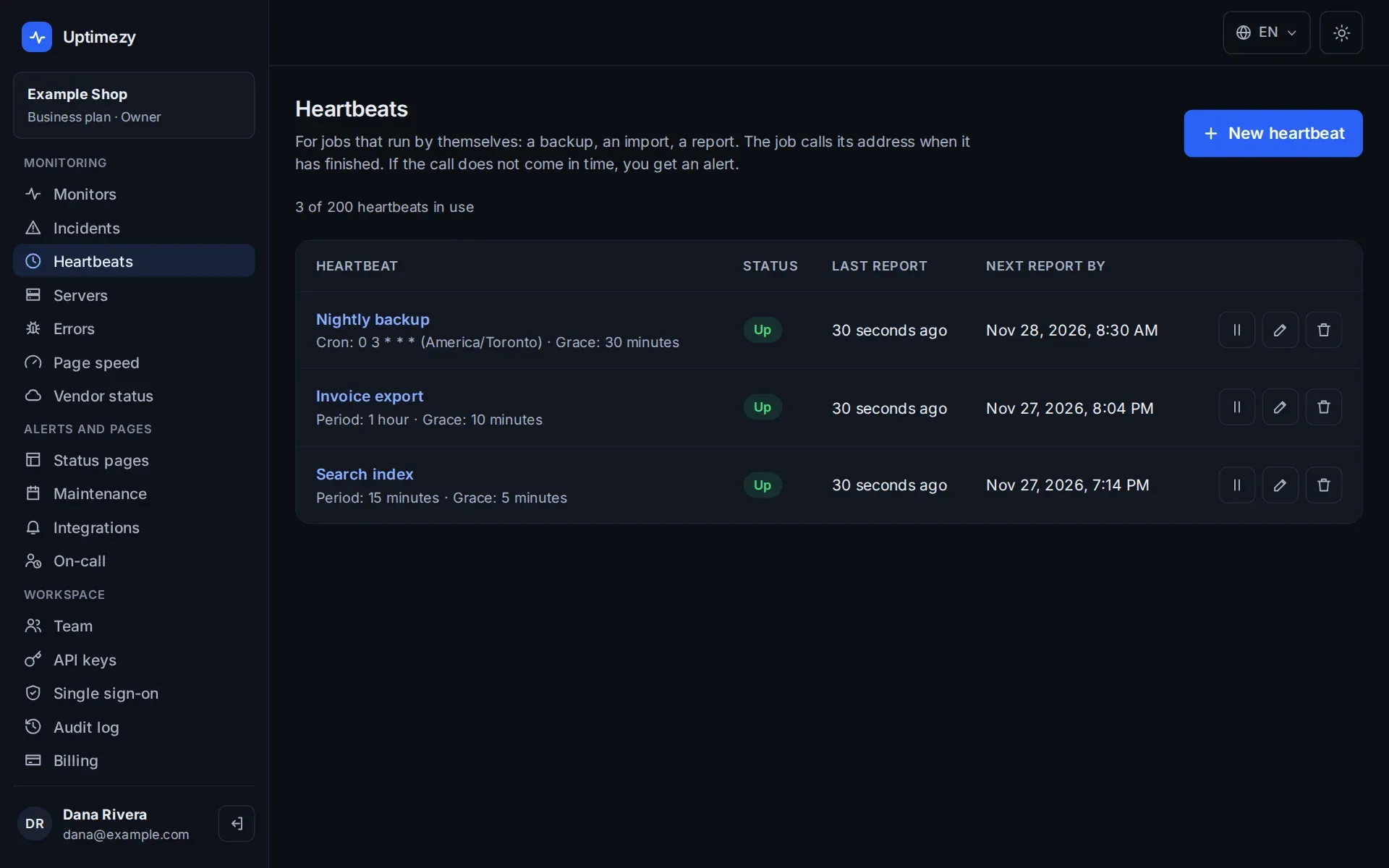
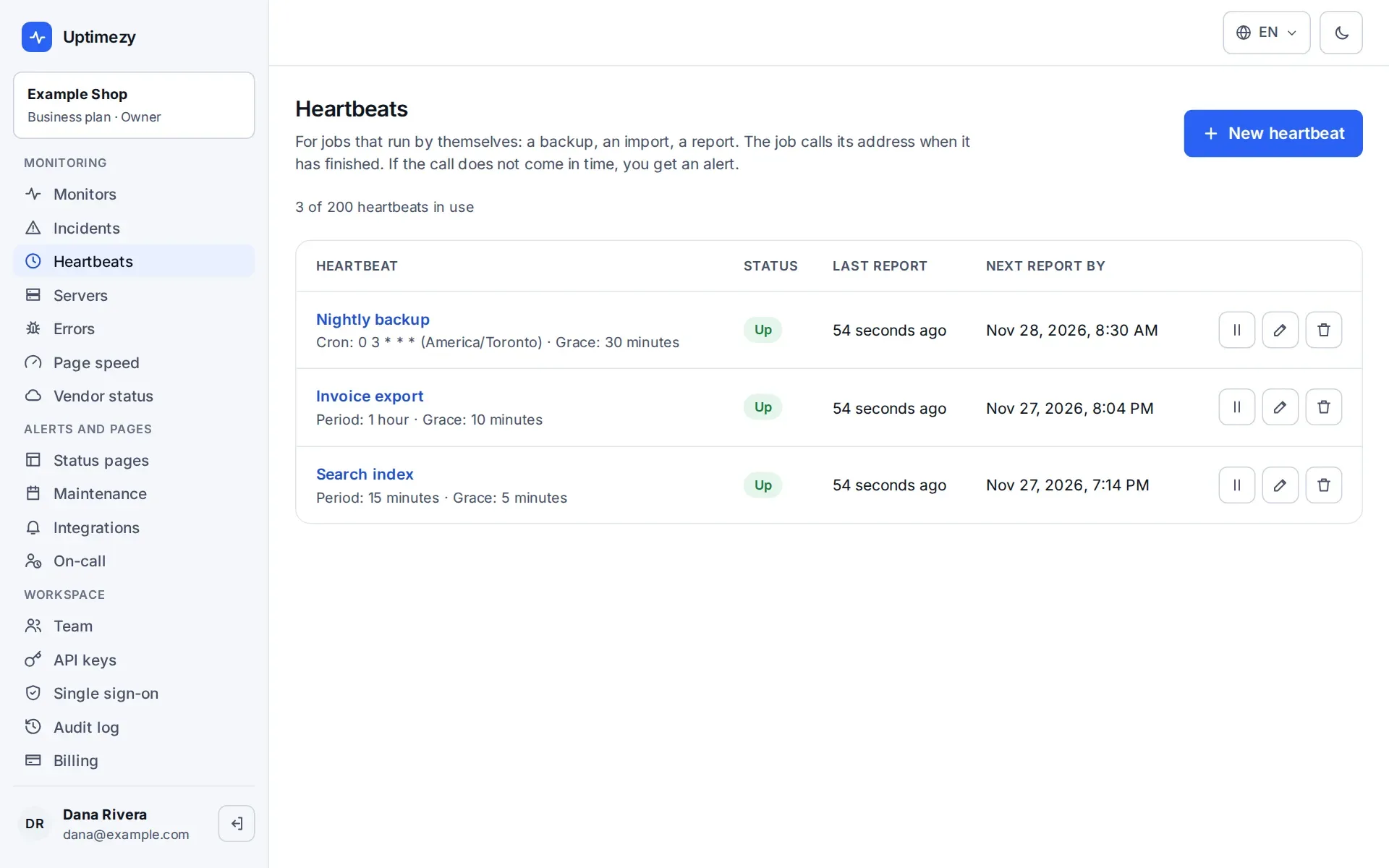
A screen from the dashboard, with example data.

The Heartbeats page: three jobs that reported on time, with their schedules.The Heartbeats page: three jobs that reported on time, with their schedules.

How it works

  1. Create a heartbeat

    Name it and set how often the job should report.

  2. Add the URL to your job

    Append one request to the end of the script.

  3. Get an alert on silence

    If the report is late or says failed, your channels are notified.

The full guide

Heartbeats, explained

Nine chapters on how a job reports, when a report is due and what happens when it does not come. Each one opens in place.

01Why a job needs a heartbeat, not a monitor

A monitor asks a server a question and judges the answer. A scheduled job has nothing to ask: it runs, ends and goes quiet. A heartbeat turns this around and waits for the job to report.

Read moreShow less
MonitorHeartbeat
Who actsWe check, at your intervalYour job calls its address
It noticesAn address that fails or answers wronglyA job that did not run, ran late, hung or reported a failure
Before an alertA second failed check in a row, confirmed by other places when there are anyNothing more: the due time passed, or the job said it failed
Behind a firewallOnly public addresses can be checkedWorks, as long as the job can reach our address over HTTPS

The two work well together: a website monitor says the site answers, and a heartbeat says the nightly work behind it ran.

Heartbeats count apart from monitors: each plan has its own number of them, 5 on the Free plan. See the pricing page.

02Three calls a job can make

Every heartbeat has one address, and two more made from it. Which one the job calls says what happened.

Read moreShow less
AddressThe job saysWhat changes
…/ping/<token>It finished wellThe heartbeat is Up, an open incident ends, and the next report is due
…/ping/<token>/startIt startedThe success must now come within the Grace time, or the heartbeat is late
…/ping/<token>/failIt failedThe heartbeat is Down at once and the alert goes out; nothing more is expected until a success
  • GET, POST and HEAD all work, so curl, wget or any HTTP client will do.
  • The answer is 200. It says paused when the heartbeat is paused and the report was thrown away.
  • A new heartbeat shows Waiting for first report and expects nothing until its first report, so it is never late before the job has run.

03When the next report is due

After each report of success, the heartbeat works out when the next one must come. It takes the job's next run and adds the Grace time.

Read moreShow less
TimingReport atNext report due by
A period of 24 hours, 1 hour of grace3:054:05 the next day: the report, plus the period, plus the grace
0 3 * * *, 1 hour of grace3:054:00 the next day: the next 3:00 run, plus the grace
0 3 * * *, 1 hour of grace2:594:00 the next day: a report up to a minute early counts for that day's run

A cron schedule takes the five parts of a crontab line, in the Time zone you choose, and follows daylight saving time: an hour skipped in spring is not expected, and an hour that comes twice in autumn is expected once. The cron explainer reads a schedule with the same rules, and the heartbeats guide lists every form it accepts.

04Choosing the grace time

The grace time is how late a report may be before you hear about it. With a cron schedule, it must cover how long the job runs, because the report is due after the scheduled start but the job reports when it ends. With a fixed period, the next report is due a period after the last one, so the grace time must cover how much the run time changes.

Read moreShow less

With the schedule 0 3 * * *, a backup that starts at 3:00 and takes 90 minutes reports at about 4:30. With one hour of grace it would be late every night. With two hours, it is late only when something is wrong.

  • With a cron schedule, set it a little above the longest run you have seen, not the usual one.
  • With /start, the grace time is also the longest the job may run: the success must come within it after the start.
  • It goes from 1 minute to 1 day in the dashboard, and is 1 hour at first.
  • Every alert about a late report waits for the grace time, so a job that runs every 5 minutes needs minutes of grace, not hours.

05Adding the call to a job

The call goes where the job ends, and only on the path where it succeeded. The heartbeat's page shows the crontab and script lines with its own address in them, ready to copy.

Read moreShow less
  • In a crontab, join the call with &&: 0 3 * * * /path/to/job.sh && curl -fsS -m 10 --retry 3 …/ping/<token>. The address is called only when the job ends without an error.
  • In a script, call …/start first, then the address itself on success, or …/fail on failure.
  • For a systemd timer, make the service Type=oneshot and put the call in it as ExecStartPost=. In a oneshot service, it runs only when ExecStart= succeeded.
  • With wget: wget -q -O /dev/null …/ping/<token>.

The curl flags matter: -f treats an HTTP error as a failure, -m 10 stops after 10 seconds so a slow network never holds the job, and --retry 3 tries again after a short network problem. More ways are in the heartbeats guide.

06Sending what the job printed

A report can carry the job's output, so the reason for a failure is waiting when you look. It is kept as plain text, and only the last report's output is kept.

Read moreShow less
  • Send it in the body of a POST, as curl --data-binary @job.log does.
  • The first 10,000 characters are kept and shown under Last output on the heartbeat's page, as plain text whatever their type.
  • Each report of success or failure replaces the output before it. A report without a body leaves it empty, and a body sent to /start is not kept.
  • Alerts do not carry the output: the email about a failure points to the heartbeat's page.

07What happens when a job is late or fails

There is no second check for a heartbeat: the job is the only witness. When its report is overdue, or says that it failed, the heartbeat is down and an incident opens.

Read moreShow less
StateWhat it means
Waiting for first reportNo report yet; nothing is expected
UpThe last report came in time
DownNo report in time, or The job reported a failure
PausedReports are thrown away and nothing is expected

We look for overdue heartbeats every 15 seconds. A late heartbeat's incident starts at the moment the report was due, not when we noticed, so its length is honest. The alert goes to the same email, chat apps and webhooks as for monitors, with escalation when nobody acknowledges.

The next report of success ends the incident, and a message says that the job reports again and how long it was in trouble. Heartbeat incidents are listed with the others on the Incidents page.
08The address, and who can see it

A heartbeat's address is its only key: whoever has it can report for the job. So we treat it as a secret, and you can replace it at any time.

Read moreShow less
  • The token in the address is 32 random letters, digits, - and _. We keep a hash of it to find the heartbeat, and an encrypted copy so the dashboard can show it again.
  • Members, admins and owners see the address. Viewers see the heartbeat but not its address, and AI assistants never get it.
  • An API key gets the address only in the answer that made it: when it creates the heartbeat or asks for a new address.
  • The address is never written to our logs, to an alert or to the audit log.
  • New address makes a new one. The old one stops working at once, so change it in your jobs too.
  • An address that does not exist gets 404, the same answer for every guess.

09Pausing, changing and the plan's number

A heartbeat can be paused for planned work and resumed afterwards. Pausing it, or moving to a smaller plan, deletes nothing; only deleting the heartbeat does.

Read moreShow less
  • Pause ends an open incident without a message, and reports are thrown away while it is paused.
  • Resume starts fresh: the heartbeat waits for the next report, as a new one does.
  • A smaller plan pauses the newest heartbeats over its number. Nothing is deleted, and resuming one needs room in the plan.
  • Deleting a heartbeat removes it and its incidents for good, and its address stops working.
  • Heartbeats can be made, changed, paused and deleted through the REST API with the heartbeats permissions. AI assistants can list them, read their incidents, and pause or resume them.
  • Status pages show monitors, not heartbeats.

Common questions

What if my job runs at irregular times?

Use a longer period with a grace time: together they must cover the longest time between two reports.

Is the heartbeat URL secret?

Yes. Each URL contains a long random token and can be replaced at any time.

Is a heartbeat checked again before the alert?

No. There is nothing to check again: once the due time has passed without a report, the heartbeat is down. Choose a grace time that covers a slow run, and the alert means the job really did not report.

Can a heartbeat be on my status page?

No. Status pages show monitors. A heartbeat's incidents are on the dashboard's “Incidents” page and go to your alert channels.

What if the job's machine has no internet?

Then its reports never arrive and the heartbeat goes late, which is usually what you want to know. The job only needs to reach our address over HTTPS; nothing needs to reach the machine.

How many heartbeats can I have?

Each plan has its own number of heartbeats, apart from its monitors: 5 on Free and 200 on Business. The pricing page lists every plan.

More features

All features

See inside every server you run.

Learn more: Server monitoring

Hear when a service you depend on has trouble.

Learn more: Third-party status

See the JavaScript errors your visitors meet.

Learn more: Error tracking

Add your first monitor in two minutes

Free plan. No credit card needed.