Add one line to your pages. When a visitor's browser meets a JavaScript error, you see it within seconds, grouped with the same errors, with where it happens and in which browsers and pages. The same line also measures how fast your pages load for real visitors.
TypeErrorCannot read properties of undefined (reading 'price')128
RangeErrorCoupon summer-2026 is not valid42
ErrorPayment provider did not answer in 10 seconds7
Alert sent
In practice
Where error tracking earns its place
Your monitors see what a server answers; error tracking sees what happens next, in your visitors' browsers. These are the moments when that difference matters.
16:20Issue resolved
09:12An error came back
09:12Alert sent
Releases
A fix that came undone
You fixed a checkout error in release 1.4.2 and resolved its issue. Two days later, release 1.4.3 brings the old code back by mistake. The first visitor who meets it opens the issue again, and an alert says that an error you resolved came back. With data-release on your line, the newest errors show 1.4.3, so you know which release to look at.
Browsers
Safari 1746
Chrome 1313
Firefox 1331
Browsers
A bug only Safari has
Code that works in Chrome can fail in Safari, and nobody on your team uses Safari. On the issue's page, “Browsers” counts its newest errors by browser and version. When 46 of the 50 kept errors come from Safari 17, the cause is in something that browser does differently, and you know where to look before you read the stack.
Pages
https://example.com/orders/:id38
https://example.com/cart9
https://example.com/3
Pages
Errors on one kind of page
A broken order page fails on thousands of addresses: example.com/orders/48213, example.com/orders/48214 and so on. Parts of an address that look like an ID are kept as :id, so the issue's “Pages” list shows https://example.com/orders/:id as one line. No customer's order number is kept in the address, and the “Page speed” screen groups pages the same way.
When a payment call fails, your code catches the error and shows a message, so the browser never reports it. One line in the catch block sends it anyway: window.Uptimezy.capture(error). It is grouped like any other error and shows as “Reported by the site”, so you see how often payments fail, and on which pages.
LCP
Phones and tablets3.6 sec
Computers1.9 sec
Page speed
Slow on phones, fine on computers
Your own computer on the office network is likely the fastest visitor you have. The “Page speed” screen shows every metric for “Phones and tablets” and for “Computers” apart. Loading at 3.6 seconds on phones is rated as needing improvement while computers stay good, which often points at what phones download and run rather than at your server.
Open issues
bakery.example.com0
dentist.example.com3
studio.example.comPaused
Agencies
One site per client
An agency can add each client's website as its own site, with its own domains, key and alerts switch. The list of sites shows how many issues each one has open, so a client with new errors stands out. A site you stop working on can be paused: its pages keep the line, and nothing more is taken until you resume it.
What is included
Grouped into issues
The same error from a thousand visitors is one issue, with its count and the browsers, systems and pages it happens on.
Where it happens
The stack shows the function, the file and the line. Upload source maps from your build, and minified code is shown as your own files, lines and code.
Alerts that know when to stop
A new issue, or one you resolved that comes back, sends an alert to your emails, chats and webhooks, at most 10 an hour per site.
Page speed from real visitors
For every visit, how long the page took to load and to react to a click or key, and, in Chrome, Edge and other Chrome-based browsers, how much it jumped: the Core Web Vitals, per page, on phones and computers.
Light and private
A small script of our own that sets no cookie, stores nothing in the browser and leaves out queries. We do not keep visitors' IP addresses, and email addresses are taken out of messages.
In the dashboard
A screen from the dashboard, with example data.
How it works
Error tracking
[1/3]
Add your site
running…✓ done
Name it and list its domains: errors are taken only from there.
[2/3]
Paste one line
running…✓ done
Put the script tag in your pages. It is pinned by its integrity hash.
[3/3]
Fix and resolve
running…✓ done
Read the stack, fix the code and resolve the issue. If it comes back, you hear about it.
The full guide
Error tracking, explained
Nine chapters on what reaches your issues, how errors are grouped and cleaned, how to work through them and what the limits do on a bad day. The steps to set it up are in the how-to guide. Each chapter opens in place.
01What reaches your issues, and what does not
The script reports three kinds of errors from your visitors' browsers. Knowing what it leaves out tells you where else to look.
Read moreShow less
Kind
What it is
Uncaught error
An error your code threw and nobody caught
Uncaught promise
A promise that failed with nobody to handle it
Reported by the site
An error your code caught and passed to window.Uptimezy.capture(error)
Messages your code writes with console.error are not sent.
Images, styles or scripts that failed to load are not reported: the browser gives no error to send.
Errors on your server are not seen, unless they make your page's code fail in the browser.
An error with neither a message nor a stack is left out.
A thrown value that is not an Error, such as throw 42 or a promise rejected with a plain text, arrives with the browser's message or that text, and without a stack. Throw real Error objects to see where it happened.
02When two errors are the same issue
Errors become one issue when they look alike in three ways: the same type, the same message once numbers are set aside, and the same top of the stack. The details decide how many issues one bug makes.
Read moreShow less
The message is cleaned first: email addresses, tokens and long numbers are replaced, then every number counts as 0. So Order 1182 not found and Order 977 not found are one issue.
The stack counts by its top three frames: the function and the file of each. The same message thrown from two different functions makes two issues.
File names are read without their host, and a build's hash with a digit in it is left out, so index-4f2a9c.js and index-9b1e07.js are the same file. A new build keeps its issues when its file names and function names stay the same once the hash is left out.
Lines and columns do not count, so code moving inside a file changes nothing.
Source maps change what you read, not how errors are grouped: uploading a map never splits or joins issues.
An issue keeps the message and the place of its first error. The place, shown under the message, is the first frame with a file: its function, path and line.
03Reading one issue
An issue's page puts what you need to start a fix on one screen. Read it from the top: how often, where, and for whom.
Read moreShow less
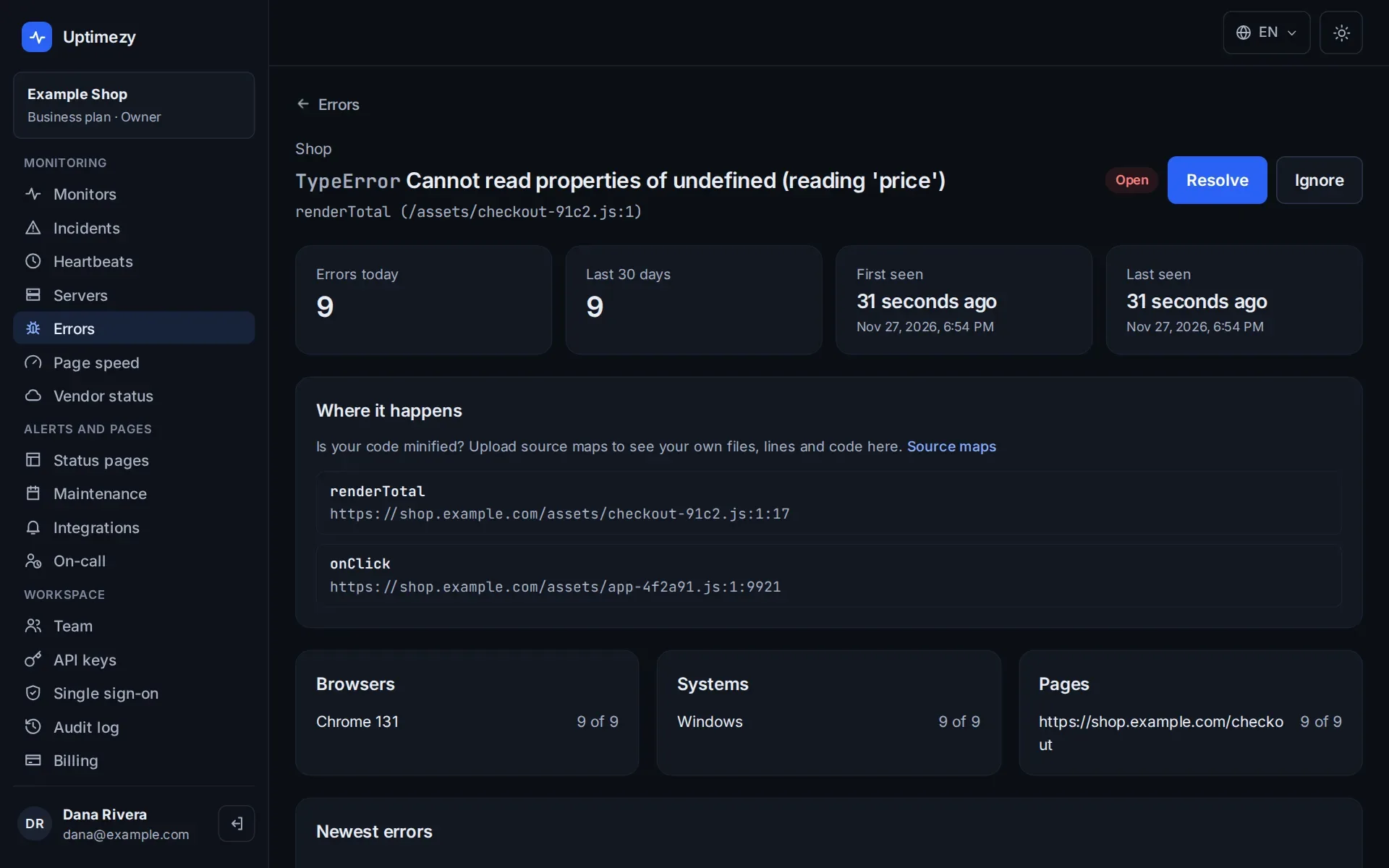
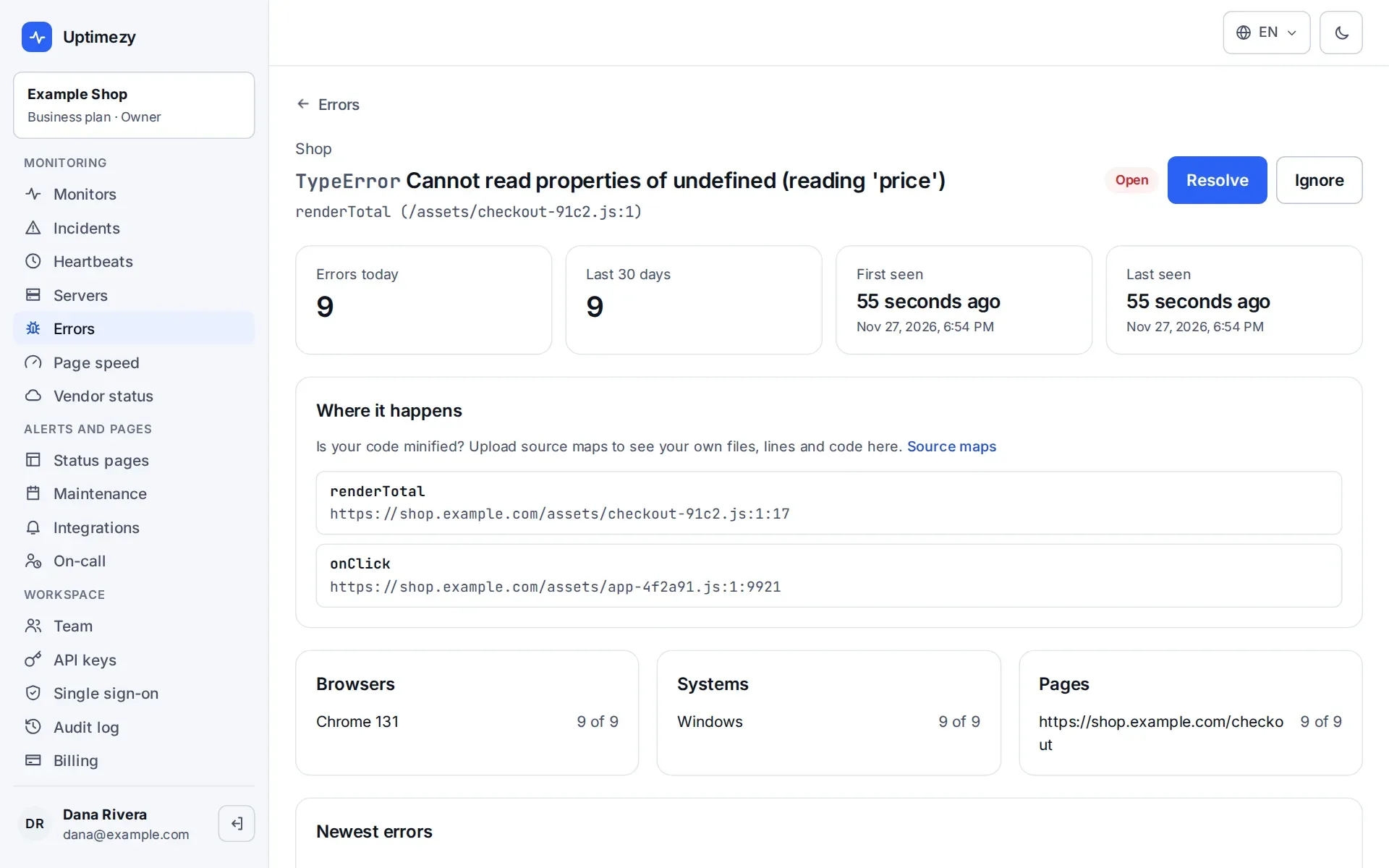
Errors today and Last 30 days say whether the error is growing; First seen often points to the release that brought it.
Where it happens is the stack of the newest error. With source maps that hold your source code, the first frame of your own code opens with three lines of code before and after its line, and frames from packages are marked Library.
Browsers, Systems and Pages count the issue's kept errors, its newest 100, and show the five most common of each.
Newest errors lists the latest 20 errors, with when, the page, the browser and the release.
When one browser or one page holds nearly all the errors, start there: the cause is often in what that browser or page does differently. Every role can read issues; viewers cannot change their status.
04Addresses and messages, as we keep them
An error's message and page come from a stranger's browser, and can carry a visitor's data. We clean them on our side, whatever the browser sent.
Read moreShow less
The browser sent
What is kept
A message: Login failed for anna@example.com
Login failed for [email]
A message: Card 4111111111111111 refused
Card [number] refused
A page: https://shop.example.com/cart?coupon=SPRING
https://shop.example.com/cart
A page: https://shop.example.com/orders/48213
https://shop.example.com/orders/:id
A part of a page's address becomes :id when it is a number of two digits or more, a UUID, 16 or more hexadecimal characters, or any part of 24 or more letters, digits, dashes or underscores. That keeps order numbers and account IDs out of the pages we store, and makes all order pages one line in Pages and on the Page speed screen.
05A routine for open issues
Issues help only when someone works through them. A short routine keeps the list honest.
Read moreShow less
Open Errors and choose Open above the issues. The issues seen most recently come first, 100 at most.
Open the top issue, read the stack and the pages, and fix the code.
Once the fix is live, press Resolve. If the error comes back within 30 days, the issue opens again, and an alert says so when the site's alerts are on.
For an error you cannot fix, such as one in another company's widget, press Ignore. It stays ignored, without alerts, while the error keeps coming. An issue with no error for 30 days is removed, so if the error comes back after that, it is a new issue and sends an alert.
Issues have no assignee and no comments, so agree in your team who looks at new ones; alerts in a shared chat make that easy. Set data-release on your line: the Release column then tells you whether an issue that came back is from the new release, or from an old page still open in someone's browser.
06What an error alert carries
An alert goes out when an issue opens and when a resolved one comes back. It carries enough to judge it from a phone.
Read moreShow less
The subject names your site, and says whether the error is new or came back.
The body has what the visitor's browser sent, shortened and with links taken out, then where it happened, the page's path and the browser.
Chats get the same. Webhooks get the events error.new_issue and error.regression, with an error_site object and an error_issue object: id, type, message, culprit, page, browser, events and first_seen.
The texts in an alert were written by a stranger's browser. Links are taken out, and names are written so that no app turns them into links, so nobody can use your alerts to send your team to a page of their choice.
The switch, the hourly limit and the daily allowance are in Issues and alerts; the webhook's headers and signature in Webhooks.
07On a bad day: limits that protect you
One broken release can make every visitor's browser report errors at once. Limits slow the flood down and keep your alerts and your list in check. A flood can still use up the month's errors; after that, errors are counted but not kept until the next month.
Read moreShow less
Limit
Beyond it
10 errors per page load
The browser sends no more; the same error twice on one page counts once
30 requests a minute from one visitor's address
Refused
600 errors a minute for one site
Counted, not kept
500 new issues a day for one site
Errors of further new issues are counted, not kept
The month's errors, for the whole workspace
Counted, not kept, until the next month
10 alerts an hour for one site
Issues past it open without an alert
The month's errors go from 5,000 on Free to 5,000,000 on Enterprise; the pricing page lists every plan. Errors shows how many errors were kept this month and how many were only counted.
Errors that cannot be stored at once are dropped and counted, never queued, so a flood of errors does not pile up and hold back the rest of the service.
08Sites, domains and keys
A site is one website or web app, with its own key, domains and alerts switch. How you split your sites decides who hears about what.
Read moreShow less
A site takes errors only from pages on its domains and their subdomains, up to 20 domains. Pages on any other domain are refused.
Add localhost to a site's domains to see the errors of your own computer while you build; the port does not matter.
Give staging its own site when its errors should not wake anyone: switch that site's alerts off and keep its issues.
Each site has its own ek_ key. It is in your pages, so it is not a secret; New key replaces it, and the old one stops within a minute.
Pause stops a site from taking errors, without removing the line from your pages.
Your plan sets how many sites you can have, from 1 on Free to 200 on Enterprise. On a smaller plan, the oldest sites keep working; newer ones show Over plan, and their errors are counted, not kept.
09Finding the slow pages
The Page speed screen shows how fast your pages were for three visits in four, metric by metric. Its parts help you decide where to start.
Read moreShow less
Choose a site, the devices and a period at the top of the screen. Phones can be much slower than computers, so look at Phones and tablets on its own.
Each metric shows its 75th percentile, its rating, and the shares that were good, needed improvement or were poor.
Day by day shows one metric's 75th percentile for each day, so a release that made pages slower shows as a step.
Pages lists the 50 pages with the most views in the period, each with its page views, LCP, INP and CLS. Pages with IDs in their address are grouped, so all order pages are one line.
A metric's value shows once 10 page views have measured it; until then, the screen says how many it has.
Your plan measures a number of page views a month, from 10,000 on Free to 10,000,000 on Enterprise, spread over the days of the month. When your pages get more views than that, a random share of them is measured, and the screen says which share. The page view counts are those measured.
Common questions
Does it slow my pages down?
No. The script is small, loads with async, and sends errors only when they happen, at most 10 per page load.
What about my visitors' privacy?
The script sets no cookie and we do not store IP addresses. The dashboard gives you a short text for your own privacy policy.
Can I see my own code instead of the minified one?
Yes. Upload your build's source maps with one command (or in the dashboard), and each stack shows your original files, lines and the code around the error. They stay private and are kept 90 days.
Does it measure page speed too?
Yes. Version 2 of the script sends the Core Web Vitals of each visit when the visitor leaves the page. You see them per page and per day, from 10,000 page views a month on Free to 10,000,000 on Enterprise; beyond that a random sample is measured.
How many errors can I send?
From 5,000 errors a month on the Free plan to 5,000,000 on Enterprise. Errors over the limit are counted but not kept.
Does it report errors my code already catches?
Only those you pass on. Call window.Uptimezy.capture(error) where your code catches one, and it shows as “Reported by the site”. Messages written with console.error are not sent.
Can I see errors from my staging site or my own computer?
Yes. Add the staging domain, or localhost, to a site's domains. Or give staging its own site with its alerts off, so its errors do not wake anyone.
Can a program read my issues?
Not with an API key: for error tracking, a key can only upload source maps. Issues are read in the dashboard, and webhooks bring the alerts about new issues, and about issues that come back, to your own systems.
Why are two different errors in one issue?
Their type, their message once numbers are set aside, and the top three frames of their stacks are the same. Errors that differ only in numbers, such as a numeric ID or a count, are grouped on purpose.