False alert prevention: alerts for outages, not for blips

Networks have bad moments. Before an incident opens, a failed check is repeated, other regions check too, and most of them must agree. You hear about real outages, not blips.

In practice

Moments where an alert could cry wolf

Each of these is a moment where a simple monitor would raise a false alarm, and what happens here instead.

Blips

A packet lost in the night

At 03:12 a check of your API gets no answer in time. Nothing is sent. Thirty seconds later the same place checks again, the API answers, and the count of failures goes back to zero. In the morning, the table under the monitor's response chart still counts the failed check, with its reason, so you can see how often it happens.

Outages

A real outage, with its route

The retry fails too, and so does the vote of the other places when there are any. The incident opens, starting at the first failed check, and the alert goes out with the reason. In the background the route to the host is traced and kept with the incident, so you see where the packets stopped.

Maintenance

Deploys that restart a service

When you deploy on Tuesday night, the service is gone for a few minutes. Plan the work on the status page that shows it and switch on “Mute alerts during the work”. Checks still run, but failures during the work open no incident, send no alert and count no downtime. The monitors show “Maintenance” until the work ends.

Heartbeats

Backups that finish a little late

Your backup should report by 02:00, but on busy nights it reports at 02:41. With a grace time of one hour, that is not late: no incident, no alert. Only a report still missing after the grace time opens an incident, and it starts at the end of that time. A job that reports a failure opens one at once.

Escalation

The team chat first, a person later

Step 1 posts to the team chat as soon as an incident opens. Step 2 emails a person 10 minutes later, unless someone acknowledged it first. A short outage that ends after 4 minutes stays in the chat and wakes nobody; a long one reaches a person. While nobody acknowledges, the last step can be reminded up to 10 times.

Status pages

No red days for hiccups

A status page counts a check as down only while a failure is confirmed. A blip that the retry cleared does not count, so a day of short hiccups still shows as a day without downtime. Your visitors see the outages that were real, and the uptime on the page is not lowered by a single lost answer.

What is included

Two failures in a row

One failed check does not open an incident. The same region checks again within 30 seconds, and only a second failure counts.

Other regions confirm

Before the status changes, up to two other regions run the same check at the same moment. Most must agree, or their result wins.

The same for good news

A monitor that is down is marked up only when the regions agree that it answers again.

Our silence is not your outage

If a region does not answer in time, our main server makes the check instead. A region that does not answer never makes your site look down.

Quiet during maintenance

Maintenance on a status page can mute the alerts of its monitors: failures then open no incident and count no downtime.

Grace for late jobs

A cron job that runs a little late is not missed: every heartbeat has a grace time before it counts as late.

In the dashboard

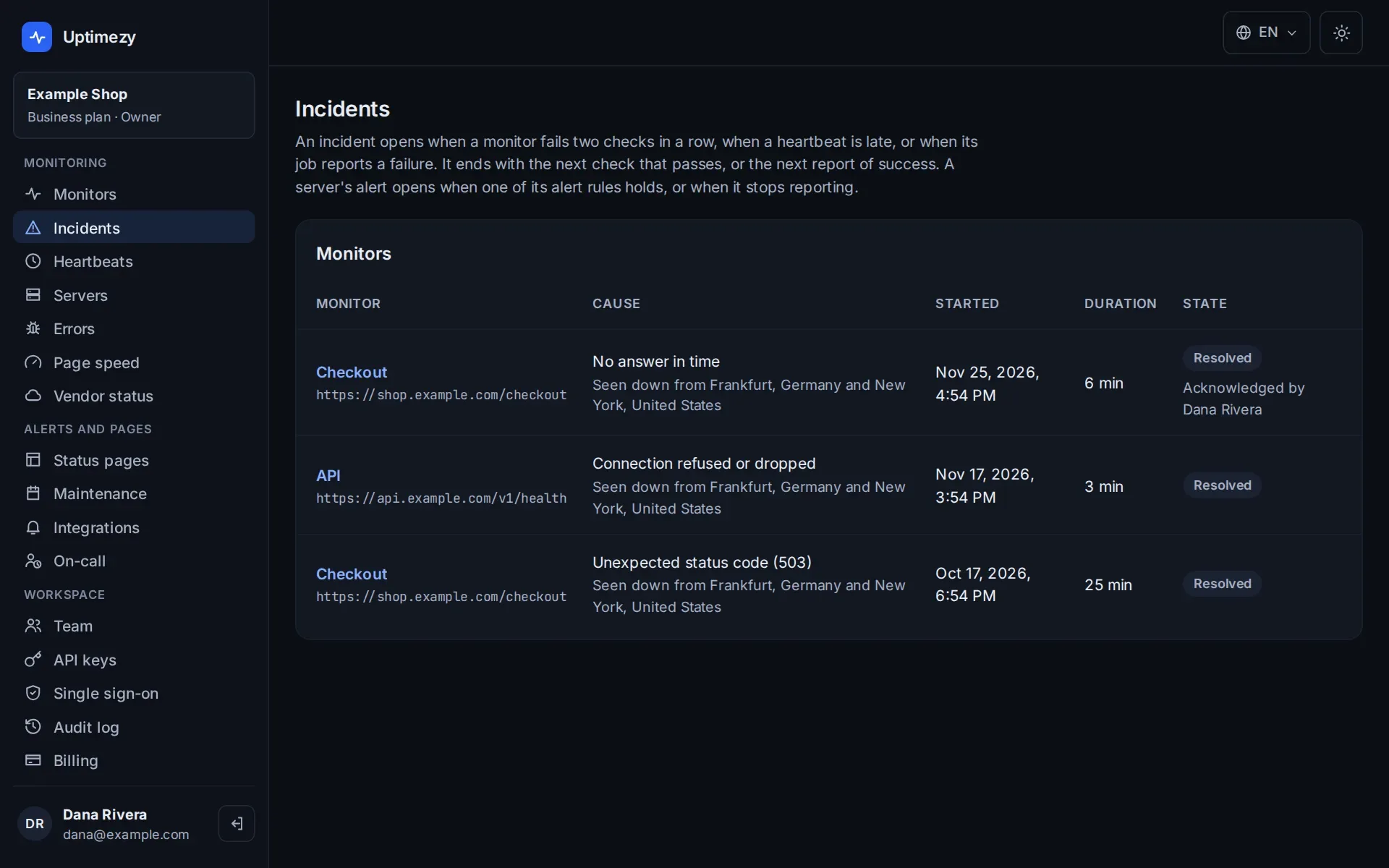
A screen from the dashboard, with example data.

The Incidents page: past incidents with their cause, the regions that saw them, how long they lasted and who acknowledged one.The Incidents page: past incidents with their cause, the regions that saw them, how long they lasted and who acknowledged one.

How it works

  1. Step 1

    A check fails

    Nothing happens yet.

  2. Step 2

    It is checked again

    From the same region within 30 seconds, then from up to two others at once.

  3. Step 3

    Most regions agree

    Only then does an incident open and your channels hear about it.

The full guide

Fewer false alarms, explained

Eight short chapters on how a failure is confirmed before anyone is told. Each one opens in place, so the page stays short.

01What happens after one failed check

A single failed check is not treated as an outage. The monitor stays as it was, and the same place checks again soon. Only a second failure in a row can open an incident.

Read moreShow less
MomentWhat happens
The first failed checkNothing is sent and the status does not change. The time of this failure is kept.
The retryThe same place checks again 30 seconds after the first check started, or at the next check when the Check interval is shorter.
The retry passesThe count of failures goes back to zero. No incident, no alert.
The retry fails tooWhen other places exist, they vote first (next chapter). Then the monitor is Down, an incident opens and the alert goes out.

The incident starts at the first failed check, not at the second one, so the retry does not make an outage look shorter than it was. The alert email says that we checked twice before sending it.

02When we run checks from more than one place

We run checks from our main server and, when our staff have added them, from probes in other places. When other places exist, they get a vote before a monitor's status changes. With only one place, its own two failures decide.

Read moreShow less

The vote is taken only for a result that would change the status: the failure that would make the monitor down, or a passing check while it is down. Up to two other places run the same check at the same moment, and the result needs most of the places that answered, the first one included.

Places that answeredWhat it takes
OneIts own result counts.
TwoBoth must agree. When they disagree, the other place's result counts.
ThreeTwo of the three must agree.

When most places disagree, the result counts as theirs. A failure that only one place sees is a problem of that place or of its network, so the monitor stays Up and its count of failures goes back to zero.

A probe that does not answer its check in time is replaced by our main server for that check. A probe that does not answer a vote is left out of it. Database monitors are checked from our main server only, so for them the two failures always decide. Checks from several places explains how the places take turns.
03The all-clear is checked as well

Good news gets a vote too. When a monitor that is down passes a check, the other places check again first, when there are any. With one place, one passing check is enough.

Read moreShow less

Once the pass stands, the monitor is Up again and the incident ends. Whoever was told that it opened gets a “back up” message that says how long it was down. That time, from the first failed check to the pass, is what the monitor page counts as downtime.

Each new pair of failures after that opens a new incident. A service that goes up and down every few minutes gives you one incident each time: there is no grouping of such flapping into one alert. If that happens, the incident list shows the pattern, and the reasons usually show the cause.

04How long confirmation takes

Confirming a failure costs a little time, and the rule makes that time easy to work out. The interval decides how soon the first failure is seen, and the retry starts at most 30 seconds later. The retry then runs for up to its time limit, and so does any vote.

Read moreShow less
StepHow long
Until the first failed checkUp to one Check interval after the problem starts
Until the retry30 seconds after the first check started, or one interval when that is shorter
Each checkUp to its Timeout: 10 seconds unless you choose another, 30 at most
The vote of other placesRight after the retry, all at the same moment. Each place gets the check's time limit, and a probe gets 10 seconds more.

An example: a server checked every 5 minutes, with the 10 second time limit, stops answering. The next check sees it, within 5 minutes. The retry starts 30 seconds after that check began, and the alert goes out once the retry and any vote are over: between 30 seconds and about a minute after the first failed check began.

To hear sooner, choose a shorter interval. Your plan sets the shortest one, down to 15 seconds on the biggest plans; see the pricing page. Whatever the wait, the incident starts at the first failed check.

05Blips you can still see

A failed check that never became an incident is not thrown away. It is kept with the other checks for 30 days, so you can see how often a host has bad moments without being woken by them.

Read moreShow less
  • The Last 6 hours strip on the monitor page counts the failed checks of every 5 minutes.
  • The table under the response chart, Show checks as a table, lists each time slot with its number of failed checks and their most common reason, such as No answer in time, for up to 30 days.
  • Through the API, the monitor's report lists recent checks with their result, their reason and the place that made them.

A blip is not downtime. It does not lower the uptime of the periods on the monitor page, from 24 hours to 365 days, or the uptime on a status page, and it is not one of the Down checks. Only the percentage next to Last 6 hours counts every failed check.

06Muting alerts during planned work

Some failures are expected: a deploy restarts a service, or a database is upgraded at night. Planned maintenance on a status page can mute the alerts of that page's monitors while the work runs.

Read moreShow less
  1. Put the monitors that the work touches on a status page, under Services. The page does not need to be public.
  2. On the page, under Planned maintenance, press Plan maintenance.
  3. Type a Title, choose the Start and the End, and switch on Mute alerts during the work.
  4. Press Announce.

While the work runs, those monitors show Maintenance. Checks still run, but a failure opens no incident, sends no alert and does not count as downtime. The count of failures starts again from zero when the work ends.

07Escalation: who hears first, and who hears later

There is no wait before the first alert: once a failure is confirmed, the first people hear at once. What you choose is who they are, and who hears later if nobody acknowledges.

Read moreShow less

Without escalation steps, every alert goes to every chat app and webhook that is on, and to every member with alert emails on. With steps, set on Integrations under Escalation, the first step runs When the incident opens, and each later step after the delay you choose, up to 24 hours after the incident opened.

That allows a calm setup: the first step posts to a team chat, the second emails a person 10 minutes later. A short incident that ends before then never reaches the second step. A real one does, unless someone acknowledged it first.

  • Acknowledging stops the later steps and the reminders, and tells everyone who was told.
  • Reminders go to the last step, up to 10 times, from every 5 minutes to every 4 hours.
  • A workspace has one escalation, with up to 10 steps, for its monitors, heartbeats and servers. See Alerts.

08Heartbeats and servers have their own safeguards

Not every alert comes from a check that we can repeat. Heartbeats wait for your jobs to report, and servers send reports from the agent, so each has its own rule against noise.

Read moreShow less
AlertWhat it waits for
A heartbeat is lateIts Grace time: 1 hour unless you choose another. The dashboard offers 1 minute to 1 day, and the API accepts up to 7 days. The incident starts at the end of it.
A job reports a failureNothing: your job said it failed, so the incident opens at once.
A server rule, such as CPU above 90%The rule's whole window: at least 80% of its minutes must have reports, and all of them must be above the limit.
A server stops reportingThe silence the rule allows, 3 minutes at least. The alert can also say whether the server's last address still answers a ping.

Read more in heartbeats and server monitoring.

Common questions

Does this delay real alerts?

A little: the second check runs within 30 seconds, and the other regions check at the same moment.

Can I be alerted on the first failure?

No. Every monitor needs two failures in a row: it is what keeps alerts true.

Can I ask for three failures in a row instead of two?

No. Every monitor follows the same rule: two failures in a row, and a vote of the other places when there are any. To send the first alert to fewer people and the rest later, use escalation steps.

Do failed checks that opened no incident show anywhere?

Yes. They are kept with the other checks for 30 days. The monitor page counts them in “Last 6 hours”, and the table under its response chart gives their reason. They do not count as downtime.

What if the place that checks has a network problem?

When other places answer, most must agree before a monitor goes down, so a problem in one place's network opens no incident. A probe that does not answer its own check is replaced by our main server; one that does not answer a vote is left out of it. With only one place, its two failures in a row decide.

Does muting close an incident that is already open?

No. Muting stops new incidents for the monitors of that status page while the work runs. An incident that was open before the work began stays open until a check passes.

Are heartbeats checked twice too?

No: a heartbeat waits for your job, so there is nothing to check again. A late report waits for the grace time you set, and a report that says the job failed opens an incident at once.

More features

All features

See where every second of a request goes.

Learn more: Response time monitoring

Uptime you can show, against the goal you promised.

Learn more: Availability and SLA

Renew before your visitors see a warning.

Learn more: SSL certificate monitoring

Add your first monitor in two minutes

Free plan. No credit card needed.