Uptime monitoring for websites, APIs and ports

Checks run from several regions around the clock. When something fails, we verify it from other regions first, then tell you what broke and why.

In practice

Where a website monitor earns its place

A website monitor fits any address that must keep answering the way you expect, and whose failure costs money, trust or sleep.

Online shop

Checkout and cart pages

The home page is often cached and looks fine while the checkout is broken. Put a monitor on the cart and checkout addresses themselves. When one starts to answer 500 or 503, the alert names that page and says “Unexpected status code (503)”, so you know where to look before customers start writing to support.

Certificates

HTTPS that must not lapse

An expired certificate takes a site down as surely as a dead server: browsers show a warning, and our check fails with “Certificate or secure connection problem”. The monitor reads the certificate's end date at every check and warns you 7, 14 or 30 days before, as you choose, then once more when less than two days are left, by email and in your chat apps.

Access

Admin areas that must stay closed

Some addresses should never open for a stranger: an admin panel, a staging site. If your server answers them with 401 or 403, expect that code. If a change makes the page answer 200 to anyone, the check fails with “Unexpected status code (200)” and you get an alert. A redirect to a sign-in page will not do: the check follows it and gets 200.

Domains

Old addresses after a move

After a move to a new domain or to HTTPS, the old addresses must keep sending visitors on. A monitor on an old address follows up to 5 redirects and judges the last page by its status code, not by its address: a loop fails with “Too many redirects”, a missing page with its code. To be sure it is the right page, use a keyword monitor.

Agencies

Many client sites in one list

An agency or a freelancer often looks after dozens of small sites on different hosts. A website monitor on each one, named after the client, puts them all in one list with their status and response time. A client can also get a public status page that shows only the sites you choose, under the names you give them.

Campaigns

Landing pages behind paid ads

When ads send paid clicks to a page that answers 404 or 500, the money is spent anyway. Add a monitor to each landing page for the length of the campaign, with a short interval. When the campaign ends, pause it: a paused monitor is not checked and sends nothing, and you can resume it for the next one.

What is included

Every kind of check

HTTP and HTTPS, a keyword present or missing, ping, TCP port, DNS records, APIs with seven HTTP methods, headers, a body and checks on the JSON, UDP services (DNS, NTP, game servers or your own request) and database queries (PostgreSQL, MySQL, MariaDB).

Confirmed from other regions

One failed check is not an outage. Other regions run the same check before an incident opens. Database checks run from our main region.

The cause, not only the fact

Each incident records the error type, the response code, which regions saw it, and the route to the host, traced when the incident opened.

Response time you can read

See the DNS and connection, TLS, server and download times of web checks, averaged per time slot. Set the longest answer time you accept, and a slower answer fails the check.

Statistics for every monitor

Uptime for 24 hours, 7, 30 and 365 days or any range, an SLA goal, a calendar of daily uptime, incidents, and the average time between failures and to recover.

Certificates and domains

A warning before an SSL certificate or a domain expires, and once more when less than two days are left. After a renewal, the warnings start over.

In the dashboard

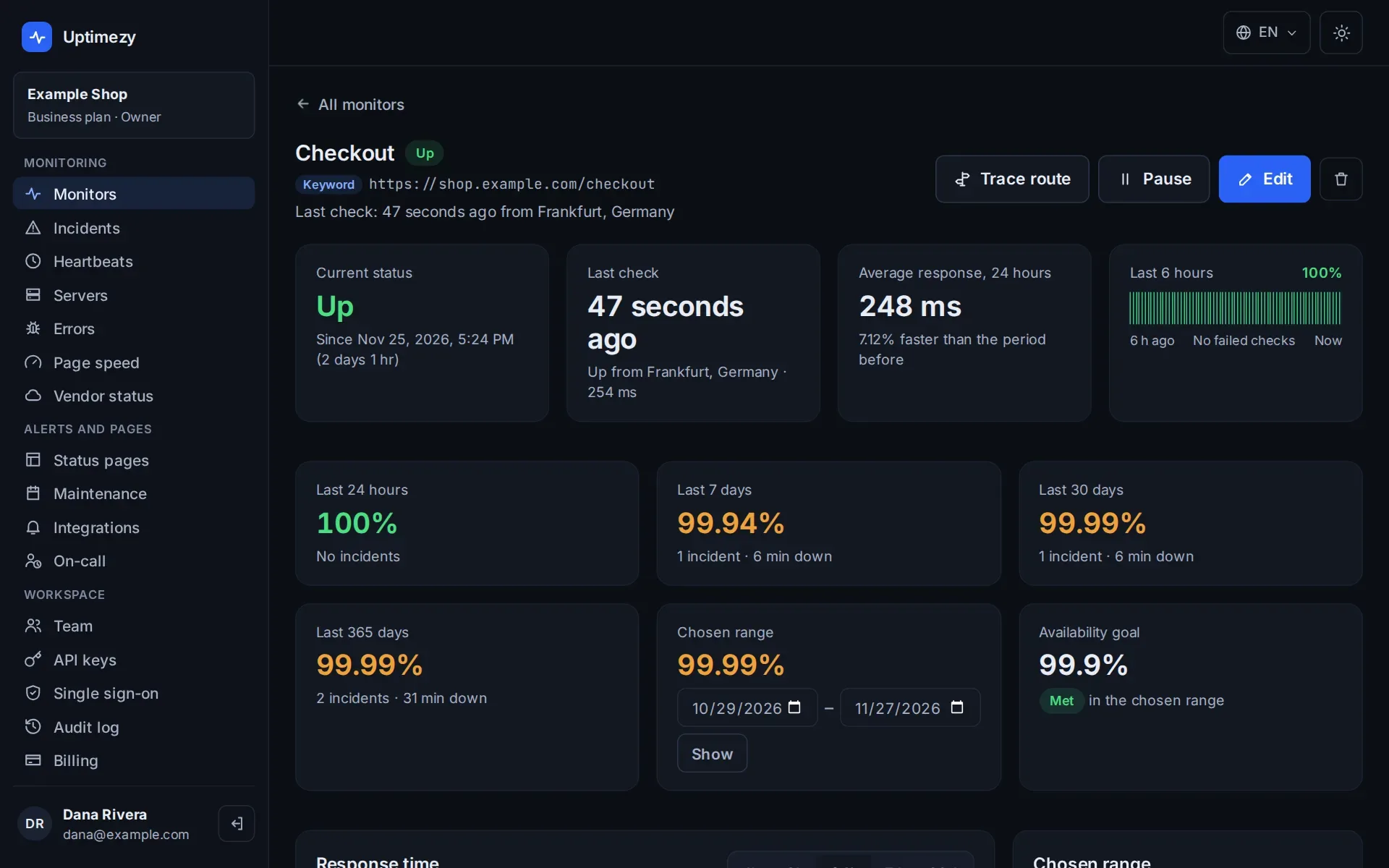
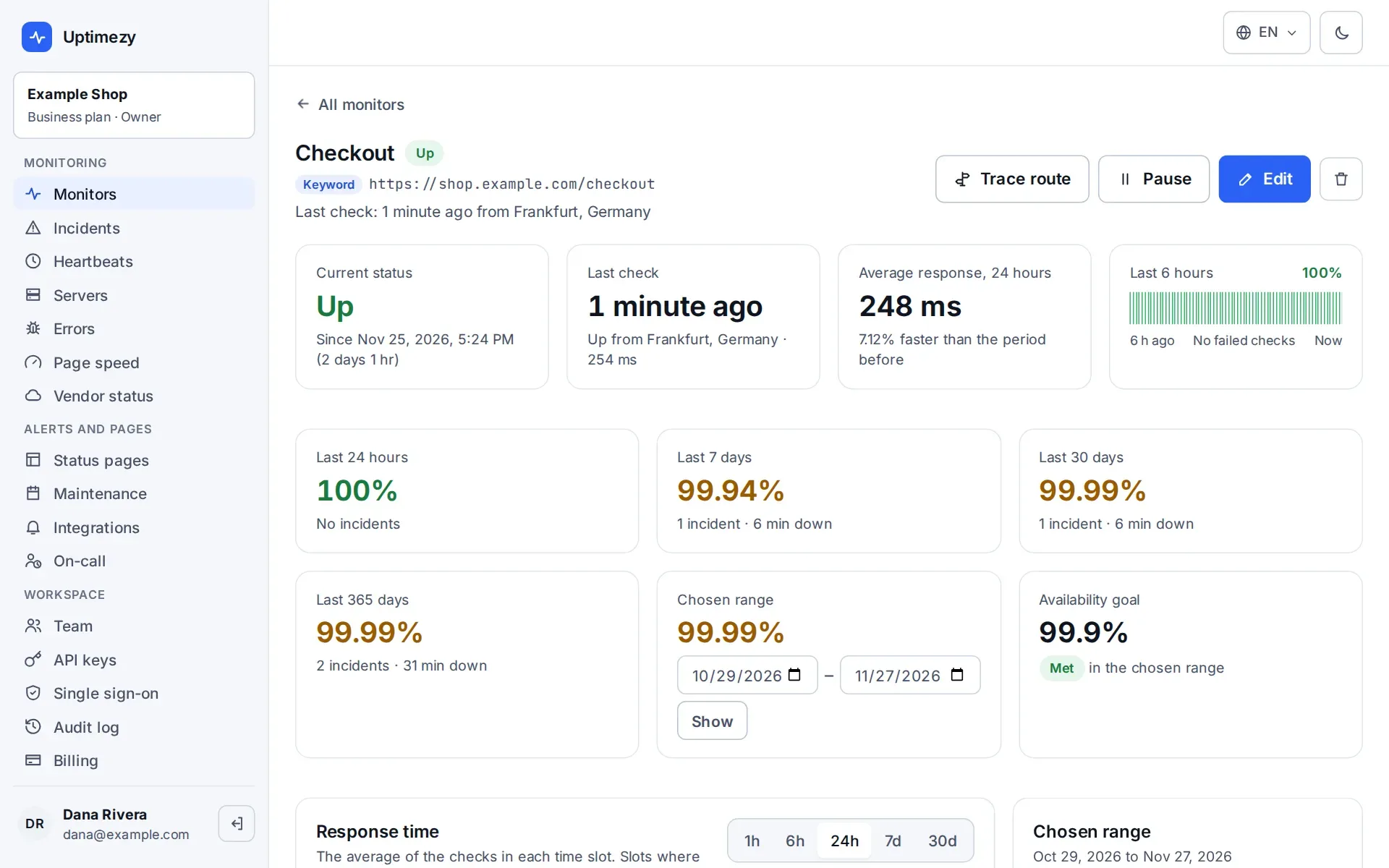
A screen from the dashboard, with example data.

A monitor's page: its status, response time and uptime over 24 hours, 7, 30 and 365 days, with an SLA goal that is met.A monitor's page: its status, response time and uptime over 24 hours, 7, 30 and 365 days, with an SLA goal that is met.

How it works

  1. Step 1

    Add a URL or host

    Paste the address, pick the check type and the interval. Good defaults do the rest.

  2. Step 2

    We check from several regions

    Regions take turns, so you get wide coverage without extra load on your site.

  3. Step 3

    You get a clear alert

    When regions agree there is a problem, your channels are notified with the cause.

The full guide

Website monitoring, explained

Eight short chapters, from the first request to the alert. Each one opens in place, so the page stays short.

01What one website check asks

A website monitor asks for one address on a schedule, much as a browser would. It follows the redirects, reads the answer and compares the status code with the one you expect. Anything else, such as an error page, a missing page or no answer at all, is a failed check.

Read moreShow less
Part of the checkWhat happens
RequestGET reads the page, up to its first 1 MB; HEAD asks for the headers only
RedirectsFollowed, up to 5; the status of the last page counts
Time limitThe whole answer, redirects included, must arrive within the Timeout: 10 seconds unless you choose another. With a Slowest allowed response (ms), a slower answer fails too
UpThe status code matches the Expected status code, 2xx at first
RecordedThe status code, the response time and its steps, why a check failed and, on HTTPS, the certificate's end date

The request carries our User-Agent and Accept: */*. It sends no cookies and keeps no connection open after the check. It runs no JavaScript, so a website monitor sees what your server answers, not what a browser draws afterwards.

02Choosing the expected status code

Most pages should answer with a code from 200 to 299, which is what 2xx accepts. Sometimes the right answer is another code, and the monitor can expect that instead. It takes one value: a class such as 4xx, or one exact code such as 200.

Read moreShow less
You want to knowExpectA failure means
The page works2xxAn error, a missing page or no answer
The page answers exactly as before200Any other code, even another 2xx
A private area stays closed401 or 403, as your server answersThe page opened for a stranger
A removed page stays removed404 or 410The old content is back online

Redirects are always followed, so the check judges the page at the end of the chain, and a 3xx code is rarely what it ends on. A wrong code fails with “Unexpected status code”, followed by the code that came, such as (503).

03Setting up a website monitor

Adding a website monitor takes a minute. Open the address in a private browser window first, so you see what a visitor without a session gets.

Read moreShow less
  1. In the dashboard, open Monitors and press New monitor.
  2. Keep Website and type the full Address, starting with https:// or http://.
  3. Give it a Name that makes sense in an alert at night, such as “Shop checkout”.
  4. Choose the Check interval and the Timeout. At first they are 5 minutes and 10 seconds.
  5. Under Request method, keep GET (reads the page), or choose HEAD (headers only, lighter) for a check that does not download the page.
  6. Leave the Expected status code at 2xx unless the page should answer something else, then press Create monitor.

The same form sets the Certificate warning, the Domain warning and an availability goal. The website monitoring guide explains the address, the status code and the warnings, and availability and SLA explains the goal.

04Why one failed check does not wake you

Networks have bad seconds. A monitor that sent an alert for every failed request would soon be ignored, so a failure has to happen twice in a row before anyone hears about it. When we run checks from more than one place, the others get a say too.

Read moreShow less
WhenWhat happens
The first failed checkNothing is sent. The address is checked again from the same place 30 seconds later, or at the next check when the interval is shorter.
A second failure in a rowUp to two other places we run checks from try the same address at the same moment.
Most places agreeThe monitor is Down, an incident opens and your channels are told. The incident starts at the first failed check.
Most places disagreeThe failure counts as a problem of that one place: no incident and no downtime.
The first check that passesOther places check again; when most agree, the incident ends and a “back up” message goes out.

With only one place, its own two failures decide. Fewer false alarms and checks from several places explain the rules in more detail.

05What an incident keeps

An alert tells you that something broke. The incident behind it keeps the details, so the next morning you can still see what happened and in what order.

Read moreShow less
  • The cause in the dashboard's words, such as “No answer in time” or “Unexpected status code (502)”.
  • When it started, at the first failed check, and when it ended, so how long it lasted.
  • Which places saw it down when the failure was confirmed, when more than one place checked. Through the API, each place's reason and status code too.
  • The route to the host, traced when the incident opened from every place that can trace, and kept for 30 days: open Route when it opened on the incident when it is there.
  • Who acknowledged it, if anyone did.

The alert email gives the address, the reason, the start time and, when more than one place checked, the places that confirmed it. Chat apps get the same facts, with a link to the monitor's page and, for a new incident, a link to acknowledge it. A status page lists the incident under the name you chose for the site, without its address or the reason.

06Interval and timeout: how soon you hear

Two settings decide how quickly a failure becomes an alert: how often the address is checked, and how long each check may wait. A shorter interval finds a failure sooner, but every monitor still needs two failures in a row.

Read moreShow less

A failure is seen at the first check after it starts, so at most one interval late. The second check follows 30 seconds later, or one interval later when that is shorter, and the other places answer within the timeout, or at most 10 seconds after it. So the alert leaves at most about one interval and 30 seconds after the first error, plus the time the checks themselves take.

PlanShortest interval
Free3 minutes
Pro60 seconds
Team30 seconds
Business15 seconds
Enterprise15 seconds

The Timeout is 5 to 30 seconds in the dashboard, and always shorter than the interval. When the whole answer has not arrived by then, the check fails with “No answer in time”. Without a limit, a slow page is not a failure. To fail on slowness, set a Slowest allowed response (ms) below the timeout: a right answer that comes slower fails with “The response came too slowly”.
07Website, keyword, API or port: which monitor?

All four can watch the same site, and each one catches something the others miss. Choose by the question you need answered.

Read moreShow less
It checksGood for
WebsiteThe status code of a page, and its time when you set a limitEvery public page and every address that must keep answering
KeywordThe status code, and a word or sentence in the pagePages that can break while they still answer 200
APIAny of 7 methods, with headers, a body, checks on the answer and a time limitAPIs, health addresses and pages behind a sign-in
PortThat a TCP port accepts a connectionServices that do not speak HTTP, such as mail or SSH

A common setup is a website monitor on every important address, a keyword monitor on the one page that proves the site really works, and an API monitor on the app's health address. Each one counts as one monitor of your plan.

08Addresses we can check, and letting us in

A website monitor checks addresses that anyone on the internet can open. Some sites block unknown visitors, and then our checks must be let in.

Read moreShow less
  • The address starts with http:// or https://, has at most 2,048 characters and uses port 80, 443, or 1024 and up.
  • It holds no user name or password. For a page behind a sign-in, an API monitor can send a header instead.
  • Private networks are refused: localhost, 192.168.1.10 and names such as intranet.corp cannot be checked, and every redirect is checked the same way.
  • A certificate that has expired, is for another name or is not signed by a known authority fails the check with “Certificate or secure connection problem”. There is no option to ignore it.

If a firewall or a bot filter blocks unknown visitors, let our checks through by their addresses or their User-Agent. Let our checks through a firewall gives the User-Agent and shows where the dashboard lists our addresses.

Common questions

How often do you check?

From every 3 minutes on the Free plan down to every 15 seconds on the Business and Enterprise plans.

Will the checks slow down my site?

No. A check is one request that reads at most 1 MB and follows up to 5 redirects, and regions take turns instead of all hitting your site at once.

Does a slow page count as down?

Only when you set a limit. Without one, time fails a website monitor only when the whole answer has not arrived within the timeout, 10 seconds unless you choose another. With a slowest allowed response, a right answer that comes slower fails the check.

Can I check a page behind a sign-in?

Not with a website monitor: its address may not hold a user name or a password. An API monitor can send a header with every request, such as an API key or a token.

Are redirects followed?

Yes, up to 5, and the status of the last page counts. A sixth redirect fails the check. There is no switch to stop following them.

What happens when my certificate expires?

The check fails, because the secure connection can no longer be trusted, and the incident says why. Before that, the monitor warns you 7, 14 or 30 days ahead, as you choose, and once more when less than two days are left.

More features

All features

Know when a page says the wrong thing.

Learn more: Keyword monitoring

Know when a host stops answering.

Learn more: Ping monitoring

Know when a service stops taking connections.

Learn more: Port monitoring

Add your first monitor in two minutes

Free plan. No credit card needed.