Domain expiry monitoring for every domain you check

We look up when your domain expires, straight from its registry, and warn you before the end. You also see whether the domain is locked against transfers.

In practice

Where domain warnings earn their place

A domain that runs out takes its websites and its email with it. These are the places where hearing a month early matters most.

Renewal

A card that expired at the registrar

Most domains renew with the card the registrar keeps on file. When that card expires or is refused, the renewal does not happen, and the registrar's email may land in an inbox nobody reads. With the default setting, the warning comes a month before the end date, to your alert emails and chats, and once more when fewer than two days are left.
Brands

A portfolio of brand domains

A company often holds more domains than it uses: old brand names, campaign sites, the .net and .org next to the .com. Give each one a monitor; for a domain without a website, a DNS monitor for the domain's own NS record is enough. The monitors list then puts a note under every monitor that is not paused and whose domain ends within its warning days.

Security

A domain that could be moved away

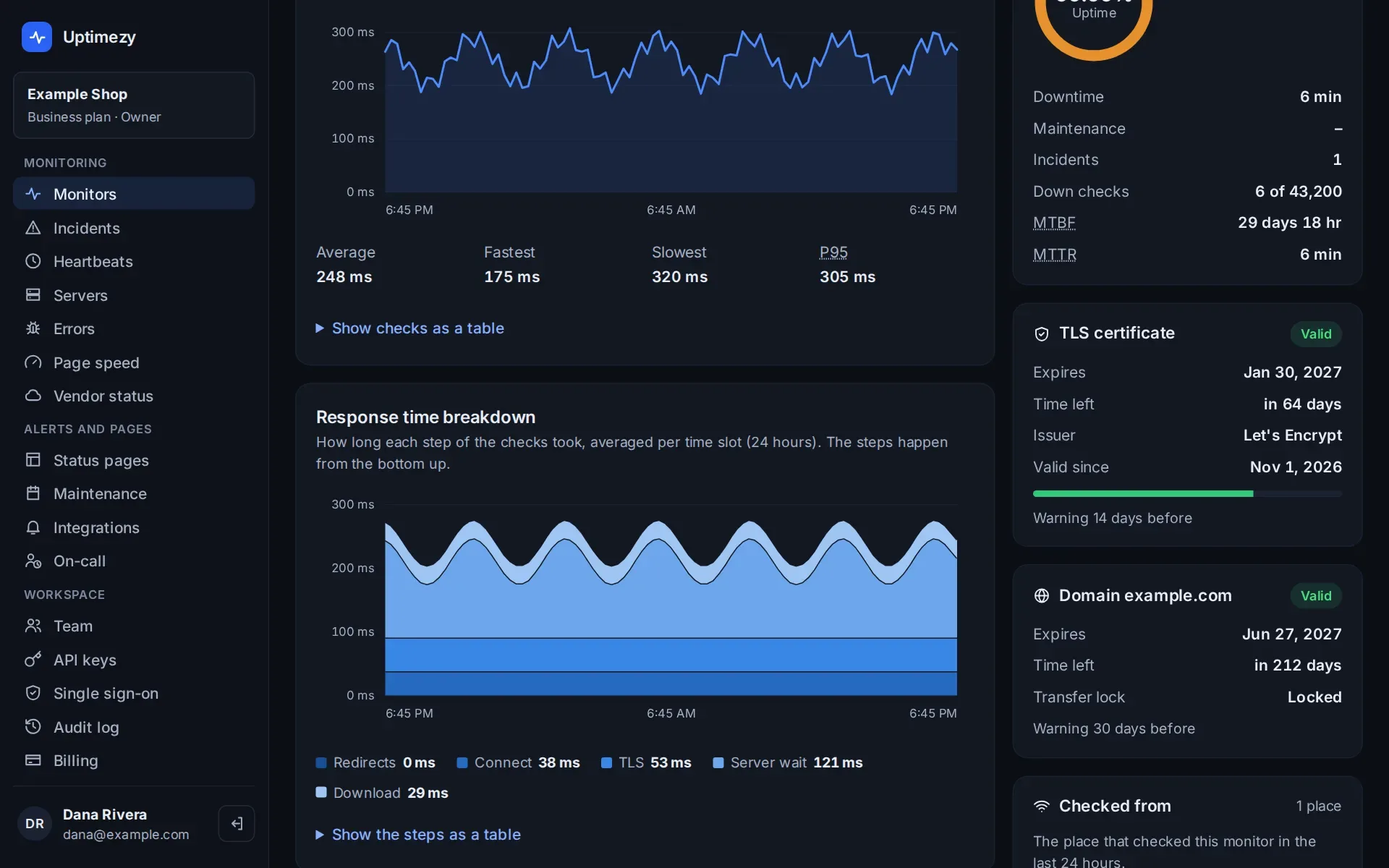
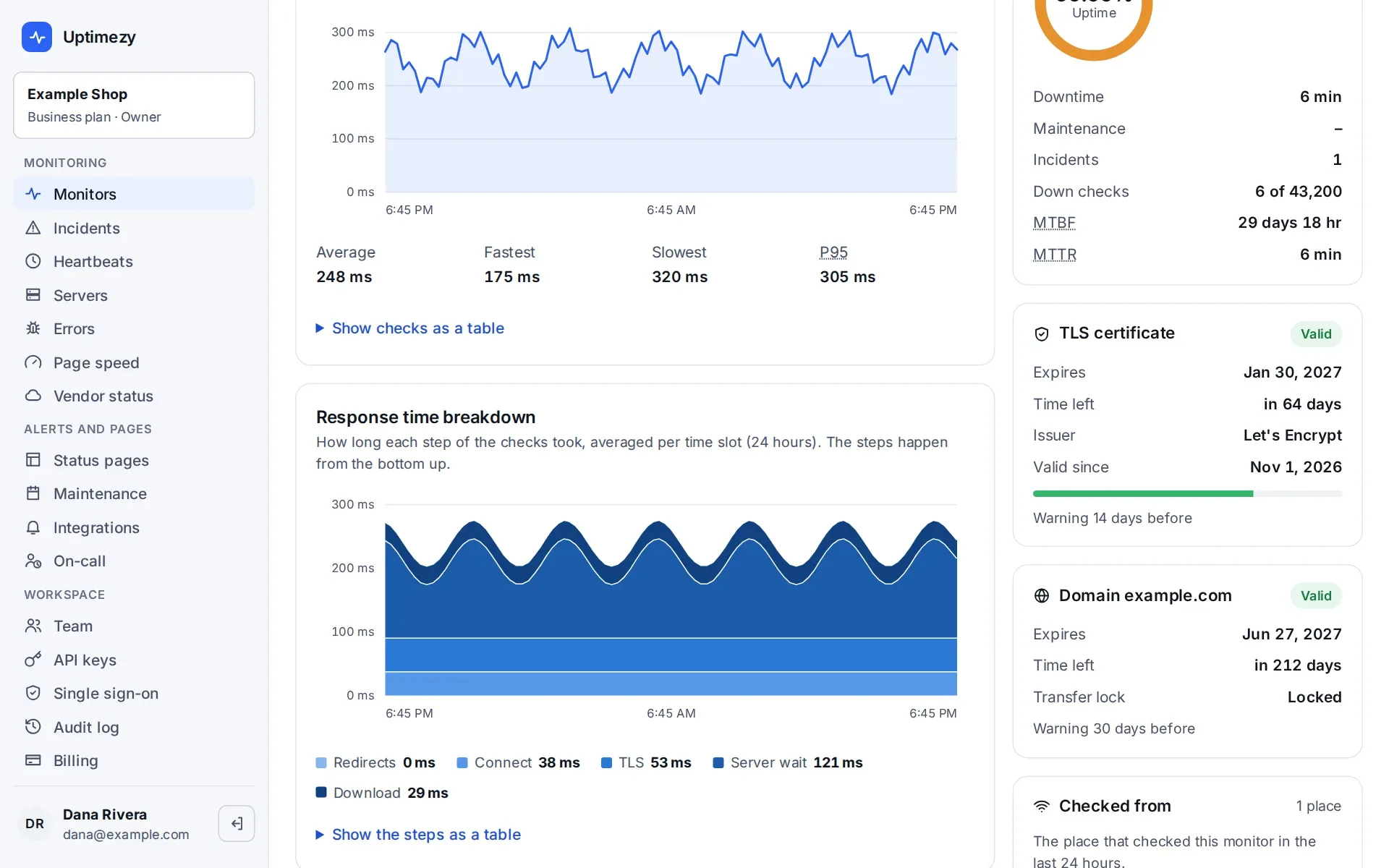
A transfer lock keeps a domain at its registrar until the lock is removed. The domain card on the monitor page shows “Transfer lock” as “Locked” or “Unlocked”, read from the registry with the end date. If a domain you care about shows “Unlocked”, ask your registrar to lock it. A change of the lock sends no alert, so look at the card now and then.

Subdomains

Twenty monitors, one domain

Your site, your API, your mail server and your status page all sit under one domain, each with its own monitor. You still get one warning per stage for the domain, not one per monitor. It follows the longest warning setting among the monitors that have it on, and names the oldest of them. While one of them keeps its warning on, the domain is still watched.

Automation

Renewals as tickets

Warnings reach the workspace's webhooks too, as the event domain.expiring with the registered domain, the end date and the days left. A receiver can open a ticket for the person who holds the registrar account, who is often not the person who runs the servers. A domain sends one webhook per stage, however many monitors use it.

Platforms

Sites on shared platforms

Not every address has a domain of yours behind it. A site at name.github.io lives under the platform's domain, and a monitor on a bare IP address has no domain at all: both are skipped, and no domain card appears. Point your own name at the platform, such as shop.example.com, and that monitor watches example.com.

What is included

From the registry

Dates come from the registry itself through RDAP, the modern replacement of WHOIS.

Warnings in time

30, 14 or 7 days before the end, 30 by default, and once more when less than two days are left.

The domain of every monitor

We check the registered domain of a monitor's host, so www.example.com and api.example.com both watch example.com. Addresses and shared platforms such as github.io are skipped.

Transfer lock

See whether the registry protects the domain against a transfer.

Looked up daily

A known date is read again every 24 hours, and a failed lookup is tried again after 6 hours.

Renewed? It starts over

When the domain is renewed, the warnings start over for its new end date.

In the dashboard

A screen from the dashboard, with example data.

A monitor's certificate and domain: who issued the certificate, when it ends, and when the domain expires.A monitor's certificate and domain: who issued the certificate, when it ends, and when the domain expires.

How it works

  1. Step 1

    Add a monitor

    Any monitor for a name in your domain.

  2. Step 2

    Choose when to hear

    30, 14 or 7 days before the end.

  3. Step 3

    Renew in time

    The warning reaches your alert channels, and once more when less than two days are left.

The full guide

Domain expiry monitoring, explained

Seven chapters on where the date comes from, which domain a monitor watches, who is warned and what the warning does not cover. Each one opens in place.

01Where the end date comes from

The date comes from the domain's registry, the organisation that runs its ending, such as .com or .org. We ask it through RDAP, the modern replacement of WHOIS, at the address IANA lists for that ending.

Read moreShow less

From the answer we keep the end date and whether a status locks the domain against transfers. Nothing about the people behind the domain is read.

What the card saysWhy
Looked up within the next hour.We have not looked up this domain yet, for example because the monitor or its warning is new
The registry of this domain does not publish its end date.The registry offers no RDAP, or answered without an end date
The registry does not know this domain.The registry has no record of the name
The registry did not answer. We try again in a few hours.No usable answer this time; we ask again after 6 hours

A known date is read again every 24 hours. Registration dates are public, so a domain watched by several workspaces is looked up once for all of them.

02Which domain a monitor watches

A monitor watches the registered domain of what it checks, not the full name. So www.shop.example.co.uk watches example.co.uk, and every type of monitor with a host has one.

Read moreShow less
MonitorWhat it checksDomain watched
Websitehttps://shop.example.com/cartexample.com
Portdb.example.com:5432example.com
Pingrouter.example.orgexample.org
DNSexample.netexample.net
Websitehttps://name.github.io/None: the domain is the platform's
Ping203.0.113.10None: an address has no domain

Names are read in lower case and a final dot does not count. A name of yours that points at a platform, such as shop.example.com on a hosted shop, is still in your domain, so its monitor watches example.com.

Heartbeats and servers with the agent are not monitors, so they have no domain warning. For a domain with no website, a DNS monitor for the domain's own NS record gives it a monitor, and so a warning.

03One warning per domain, for the whole workspace

Each monitor has a Domain warning of 7, 14 or 30 days, or No warning, and new monitors start at 30. The warnings themselves belong to the workspace: however many monitors use a domain, it is warned once per stage.

Read moreShow less
  • The domain job runs every hour. It sends the first warning once the days left are within the longest setting among the domain's monitors: with one at 7 days and one at 30, it comes at 30.
  • A final warning comes when fewer than two days are left. After the end date, no more warnings come.
  • When you renew, the new date is read at the next daily lookup, and the warnings start again for it.
  • The email names one monitor that uses the domain: the oldest one that has the warning on. Paused and suspended monitors are left out.
  • While another monitor of the same domain keeps its warning on, the domain is still warned about. The longest setting among the monitors that still have it on decides when.
  • Each workspace is warned on its own, so an agency and its client in two workspaces both hear.

Certificates work the other way: each monitor reads its own certificate and warns on its own, see SSL certificate monitoring. The setting is also domain_expiry_days in the API.

04Getting the warning to whoever can renew

A domain is renewed at its registrar, often from an account that belongs to one person, or to another company. A warning helps only if it reaches that person in time.

Read moreShow less
  • Email goes to every member of the workspace who has alert emails on. It names the domain, the day its registration ends, the days left and one monitor that uses it, and asks you to renew with your registrar.
  • If your plan has room for another member, invite the person who holds the registrar account, as a viewer if they need nothing else, and make sure their alert emails are on.
  • Chats get the same warning, so a shared channel works when several people can renew.
  • Webhooks get the event domain.expiring with an expiry object: kind, domain, expires_at and days_left. A receiver can open a ticket for the team that pays for domains. See Webhooks.

Each message counts toward your plan's daily messages, such as 100 a day on Free, and the delivery log lists every warning with the domain it was about. A warning is not an incident: it has no escalation steps and nothing to acknowledge.

05The transfer lock

The registry's statuses also say whether a domain is locked against a transfer to another registrar. The card on the monitor page shows it next to the end date.

Read moreShow less
  • Locked: a status says transfers are prohibited, set by your registrar or by the registry.
  • Unlocked: no status says that transfers are prohibited.
  • When the registry publishes no end date, the card shows neither the date nor the lock.

We show the lock; we do not alert when it changes. The lock is read with the end date, once a day. Look at the card after you change registrar or account, and ask your registrar to lock the domains that should stay where they are. The same lock is in the API as domain_transfer_locked.

06Expiry, DNS and the site: three different failures

A domain can let you down in three ways, and each has its own tool. Domain warnings cover the first one only.

Read moreShow less
Domain warningDNS monitorWebsite monitor
It watchesThe registration's end dateThe records the name points toThe page at an address
It noticesA renewal that has not happenedA record that is gone, or no longer has the value you expectA site that does not answer as it should
You hearDays or weeks beforeWhen the record is wrongWhen the failure is confirmed
It needsAny monitor in the domainA host and a record typeA web address

You can use all three on your main domain. A DNS monitor for the NS record, with one of your name servers as the expected value, tells you when that name server is no longer listed. An end date does not show that.

07Looking up a domain once

For a domain you do not monitor, or to see more than the card shows, use the Whois tab of the free check. It asks the same registries, without an account.

Read moreShow less

The Whois tab shows the registrar, when the domain was registered and last changed, when it expires, its statuses, its name servers and whether DNSSEC is on. The monitor card shows only the end date and the transfer lock.

  • Type a domain, a host or a web address: the registered domain is found from it.
  • Answers are kept for 10 minutes, so asking again soon gives the same answer.
  • When many visitors ask at once, a lookup can be refused; try again a minute later.
  • A registry without RDAP cannot be looked up there either.

Common questions

My domain shows no date. Why?

Some registries publish no RDAP data, so there is nothing to read. The monitor page says so.

Do I need a separate monitor for the domain?

No. Switch the warning on in any monitor whose host is in the domain.

How many warnings do I get when many monitors use one domain?

One per stage for the workspace, not one per monitor: usually a first warning and a final one for each end date. It follows the longest warning setting among those monitors.

I renewed the domain. When does the date change?

At the next daily lookup: a known date is read again every 24 hours, and the warnings start again for the new end date.

Do you warn when the transfer lock is removed?

No. The monitor page shows whether the domain is locked, read with the end date once a day, but a change sends no alert.

Can I watch a domain that has no website?

Yes, through any monitor whose host is in the domain. A DNS monitor for the domain's own NS record works for a domain that only holds email or waits for later use.

More features

All features

From the first failure to the all-clear.

Learn more: Incident management

The right person, on the right channel.

Learn more: Alerts and escalation

Tell customers before they ask.

Learn more: Status pages

Add your first monitor in two minutes

Free plan. No credit card needed.