Ping monitoring for servers, routers and any public host

A ping monitor sends ICMP echo requests to a host and records how long the answer takes. When the host stops answering, it is pinged again and from other regions before you are alerted.

In practice

Where a ping monitor earns its place

Ping fits anything with a public address that answers ICMP, and that matters enough for its silence to reach someone within minutes.

Network

Office routers and firewalls

Network equipment will never run an agent, but the public address of an office router or a firewall usually answers a ping. A monitor on each one turns “the internet is weird today” into a record of which box stopped answering, and when, often before the first support ticket.

Servers

Dedicated servers and VPS hosts

The cheapest sign that a machine is alive. Pair it with an HTTP monitor on the site it serves: ping down and HTTP down means the host is gone; ping up and HTTP down means the host is fine and the application is not. Add the server agent when you also want CPU, memory and disks.

Connectivity

VPN gateways and site links

A tunnel endpoint that stops answering is a branch office that just went offline, whether or not anybody there has noticed. When the incident opens, a trace route runs by itself, so you also see the last hop that still answered.

Latency

Game servers and voice relays

Real-time traffic cares about the round trip far more than about bandwidth. The chart shows the average, fastest, slowest and 95th percentile round trip, from the last hour to 30 days, so “it feels laggy sometimes” becomes a curve you can show.

Infrastructure

Name servers and mail servers

When a name server or a mail server disappears, nothing looks broken at first: mail waits in queues and old DNS answers stay cached. A ping on each machine says at once whether it is still there; a DNS monitor and a port monitor on port 25 then say whether it still does its job.

Provider

Holding your host to account

A record of reachability and round trip, measured from our servers rather than from inside your provider's network: uptime for the last day, week, month and year, and every incident with its cause. When support says “we see no problem on our side”, you have the dates.

What is included

A real ICMP ping

We send an echo request every second until the host answers or the time limit is reached, and record the round trip of the first answer.

Any public host

A name or an address, IPv4 first, then IPv6. Private addresses are refused, so nobody can use our checks to reach inside a network.

Your time limit

Wait up to 30 seconds for an answer, 10 by default, always less than the time between checks.

Round trip over time

Charts from the last hour to 30 days, with the average, the fastest, the slowest and the 95th percentile.

Checked again before you hear

A host that does not answer is pinged again, and from other regions, before an incident opens.

The reason in every alert

“No answer in time”, “Address not found (DNS)” or “Address leads to a private network”: you know what happened before you open the dashboard.

In the dashboard

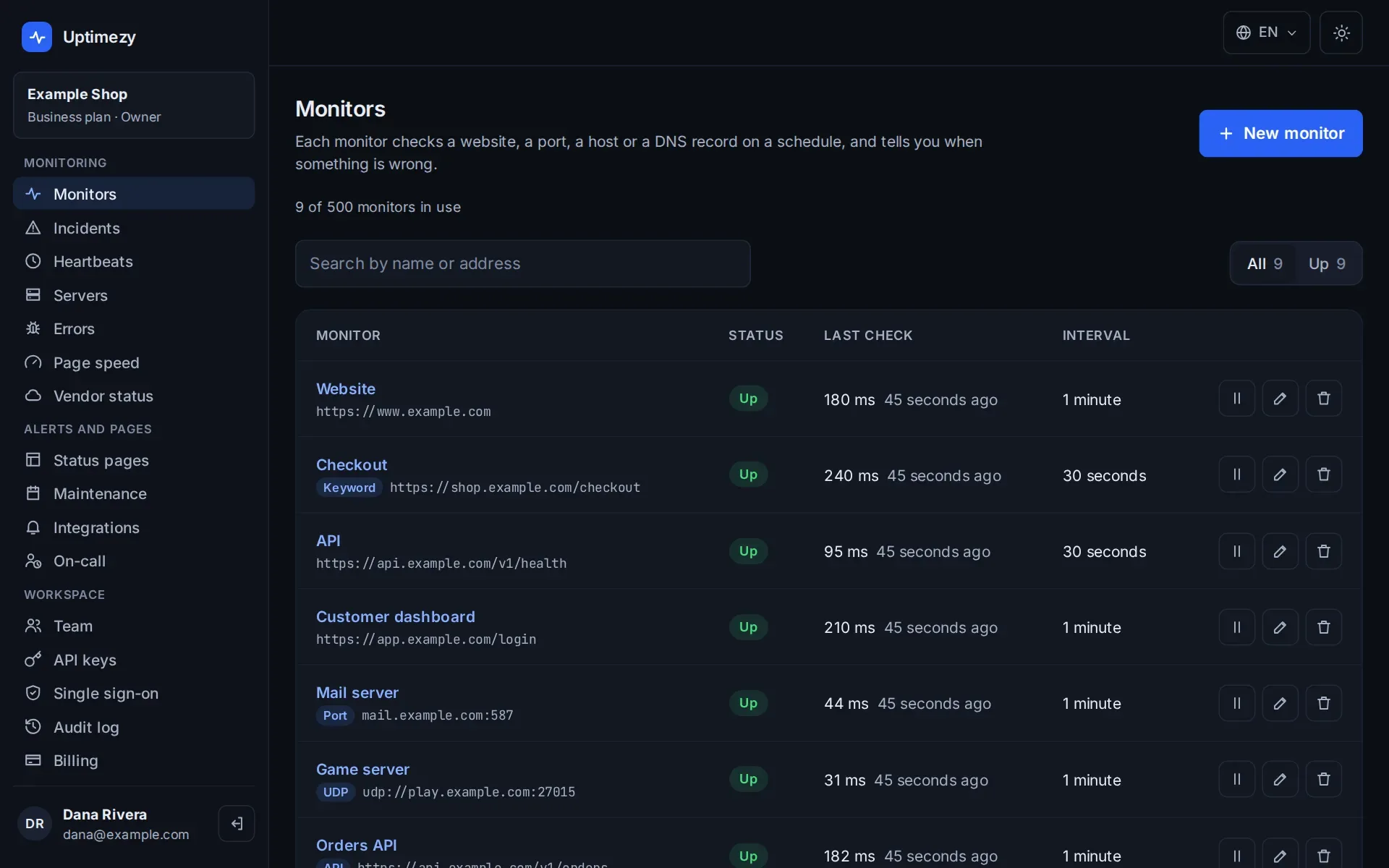
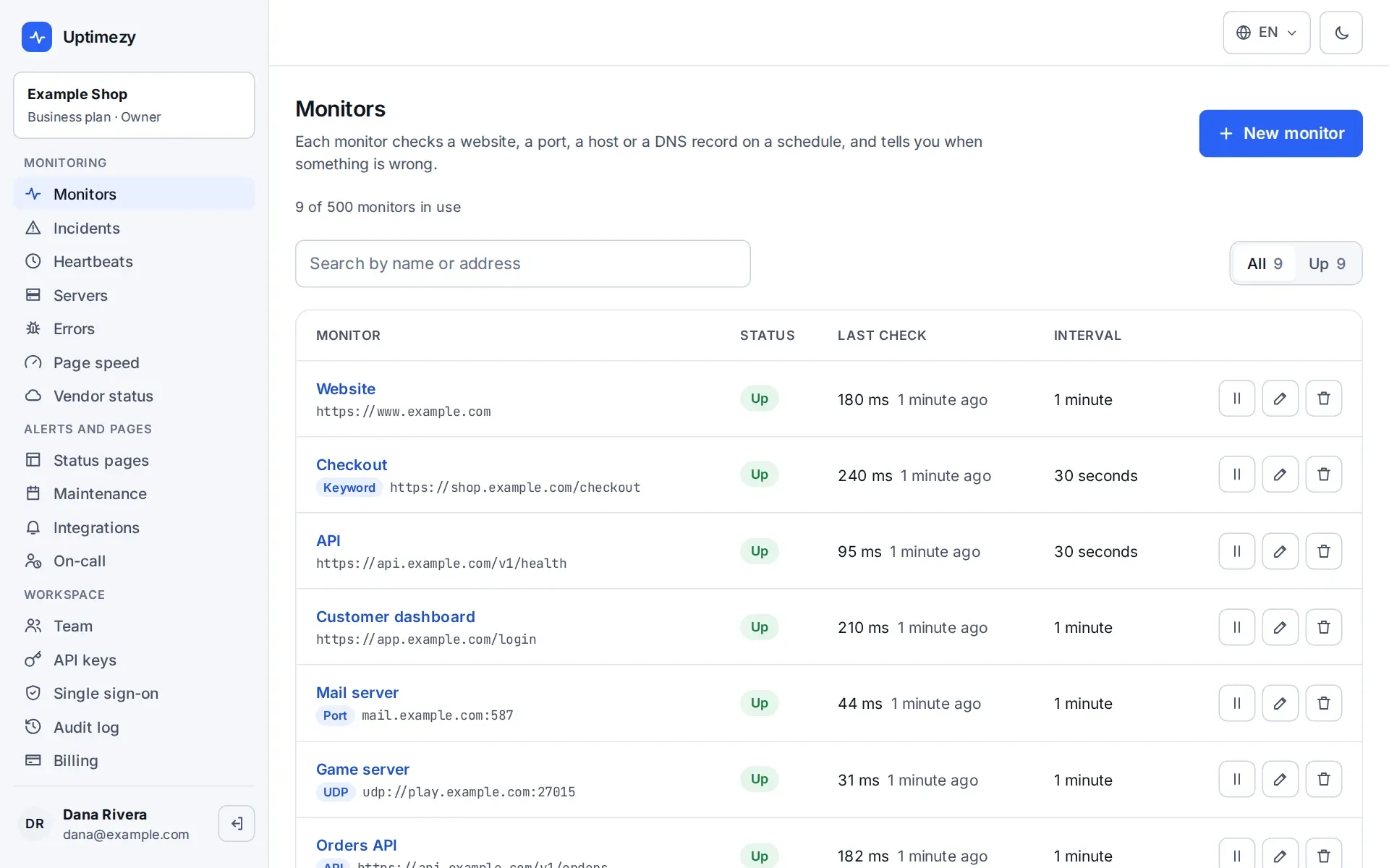
A screen from the dashboard, with example data.

The Monitors page: nine monitors of different types, all up, with their response times and check intervals.The Monitors page: nine monitors of different types, all up, with their response times and check intervals.

How it works

  1. Step 1

    Add the host

    Type its name or address and choose Ping as the type.

  2. Step 2

    We ping it

    Regions that can send pings take turns, at the interval you chose.

  3. Step 3

    Hear when it stops

    When regions agree that the host is silent, your channels are told.

The full guide

Ping monitoring, explained

Each chapter opens in place, so the page stays short.

01What ping monitoring is

Ping is the oldest useful question on a network: here is a small packet, please send it straight back. The protocol is ICMP, the packet is an echo request, and the echo reply tells you two things: the host is reachable, and how many milliseconds the round trip took.

Read moreShow less

A ping monitor asks that question for you, on a schedule, from our servers. Every answer is kept, so you see the round trip change over hours and days, and when the answers stop, the people who need to know are told.

Ping answers one question only: is the host there? It does not say whether a website, a database or a mail server on that host works. For those, add an HTTP monitor, a port monitor or a database monitor beside it.

02A ping test shows one moment; a monitor watches the rest

Most people start with a ping test: something feels wrong, they ping the host, and it answers, because whatever went wrong has already passed. A test only describes the seconds it ran in. A monitor runs the same test again and again, without you, and tells someone when the answers stop.

Read moreShow less
A ping testA ping monitor
When it runsWhen you start itOn a schedule, day and night
Who notices a failureYou, if you are lookingYour channels: email, webhooks and 9 apps
A second opinionNonePinged again, then from the other places we run checks from
HistoryNoneEvery check for 30 days, uptime for up to a year
Where the path breaksA trace route, if you think of itA trace route that runs when the incident opens

A one-off test still has its place before you add a monitor: the free check pings a host from our servers, without an account.

03How one ping check runs

A check starts by looking up the host name with the resolver of the place that runs it. It takes the first public IPv4 address, or the first public IPv6 address when there is no IPv4 one. Then it sends an ICMP echo request, and another every second, until a reply comes or the time limit is reached.

Read moreShow less
Part of the checkWhat it does
RequestsOne echo request a second, until the first reply
Time limit10 seconds unless you choose another, up to 30, always shorter than the time between checks
UpA reply to any of the requests
DownNo reply before the time limit; “unreachable” messages do not count as replies
KeptThe round trip of the first reply, in milliseconds

04Setting up a ping monitor

A ping monitor takes a minute to add. Make sure the host answers ping first, so the monitor is not down from its very first check.

Read moreShow less
  1. Try the host with the free check. If it does not answer there, it will not answer the monitor either.
  2. In the dashboard, open Monitors and choose New monitor.
  3. Choose Ping as the type and type the host's name or public address in Host, without https:// or a path.
  4. Give it a short Name: alerts and the dashboard show it, so “office-router-1” beats “Monitor 7” the first time it wakes you up.
  5. Choose the Check interval: every minute for anything that is costly when down, every few minutes for an ordinary server, once an hour for a device you only need to know is still there.
  6. Keep the Timeout at 10 seconds unless the host is far away or slow to answer, then press Create monitor.

The first checks show the host's normal round trip. That baseline is what makes the first real change easy to spot.

05What happens when the replies stop

One failed check is a signal, not an outage. Before anything is called down, the host is pinged again and other places are asked.

Read moreShow less

After a first failure, the host is pinged again 30 seconds later, or at the next check when your interval is shorter. If that fails too, the other places we run checks from ping it at the same moment, up to two of them, and a majority must agree. Only then does an incident open and your channels hear about it. A recovery is confirmed the same way before the “back up” message goes out.

The alert says why the check failed, such as “No answer in time” or “Address not found (DNS)”. When the incident opens, a trace route runs by itself and is kept with the incident, so you also see where the path stopped.

Alerts go by email, to webhooks and to 9 apps such as Slack, Telegram and PagerDuty. Escalation steps tell the next person when nobody reacts, and on paid plans an on-call schedule decides who that is.
06Ping, port or HTTP: which monitor?

These three checks answer three different questions. Ping asks whether the host is there, a port monitor whether a service is listening, and an HTTP monitor whether the website answers as it should.

Read moreShow less
PingPortHTTP
It asksIs the host there?Is the service listening?Does the site answer correctly?
It sendsAn ICMP echo requestA connection to one TCP portA request to a web address
It noticesA host or a path that is goneA stopped service or a closed portErrors, wrong status codes, a missing word
It needsA host that answers pingA port open to the internetA web address

Many teams use all three: ping on every host for the cheap “is it there” signal, and HTTP monitors on the pages where a failure costs money.

07Limits worth knowing

Ping is a narrow tool. Knowing where it stops keeps it from becoming the monitor that cries wolf.

Read moreShow less
  • Hosts that drop ping look down. Many firewalls and cloud networks drop ICMP; use a port monitor on a port the host keeps open, such as 22 or 443.
  • Public addresses only. Private ranges and internal names such as .local or .internal are refused, so nobody can use our checks to look inside a network. For machines inside your network, the server agent reports from the inside: it only sends, over HTTPS, and opens no port.
  • No packet loss figure. One reply is enough for the host to be up, so a link that drops some packets still looks up.
  • IPv6 only without IPv4. When a name has a public IPv4 address, that address is pinged; IPv6 is used only when there is none.
  • A reply is not a working service. The operating system answers ping even when every application on the host has stopped.

08What the data looks like after a month

A single test gives a number. A month of checks gives a shape: the normal round trip, the hours when it climbs, and every time the host went quiet.

Read moreShow less

The chart shows the average, fastest, slowest and 95th percentile round trip for the last hour, 6 hours, 24 hours, 7 days or 30 days, for every place together or one place at a time. Only answered checks count toward it.

Uptime is shown for the last 24 hours, 7 days, 30 days and 365 days, or any range up to 400 days, with the time between failures and the time to recover. Give the monitor an uptime goal and the dashboard shows whether it was met. Every check is kept for 30 days.

09What it costs

A ping monitor counts like any other monitor. The Free plan has 10 monitors, checked every 3 minutes, with no time limit and no card.

Read moreShow less

Paid plans start at $7.50 a month, billed yearly, and the biggest plans check as often as every 15 seconds. The pricing page compares every limit.

A ping is one of the lightest checks there is, so it is rarely the monitor you have to ration. A common setup is a ping monitor on every host and HTTP monitors on the few pages where a failure costs money.

Common questions

Do you measure packet loss?

No. A ping check waits for one answer and records its round trip. A host that answers is up.

My firewall blocks ping. What can I use?

Many firewalls drop ICMP. Add a port monitor for a port the host keeps open, such as 22 or 443, instead.

Which hosts can I ping?

Any public host name or address. Private addresses and internal names are refused, so nobody can use our checks to look inside a network.

Can I see where the path breaks?

Yes. When an incident opens, a trace route runs by itself and is kept with the incident, and you can run one from the monitor's page at any time.

Can a ping monitor be on my status page?

Yes. Any monitor can be shown on a status page, under the name you give it there. The page never shows the host's address or why a check failed.

Can I add ping monitors through the API?

Yes. Create a monitor of the type ping with its host through the REST API, or ask an AI assistant connected over MCP to do it.

More features

All features

Know when a service stops taking connections.

Learn more: Port monitoring

Check what your API answers, not only that it answers.

Learn more: API monitoring

Know when a DNS record disappears or loses the value you expect.

Learn more: DNS monitoring

Add your first monitor in two minutes

Free plan. No credit card needed.