A REST API for your monitors, heartbeats and servers

Your programs use the same API as the dashboard. With a key, they manage monitors, heartbeats, servers and status page posts, and read reports and incidents.

In practice

What teams build on the API

A key with the right permissions lets your own scripts create, read and react. These are typical jobs for it, each with the smallest key that does it.

Provisioning

A monitor for every new site

When your platform starts a customer's site, the same script can create its monitor and add its server. The answer for a server holds its token and the install command, once, so the agent can be installed in the same run. Monitors and servers count toward your plan, and a request over a limit is refused with the code plan_limit_reached.

Deploys

Quiet monitors during a deploy

A deploy script can pause the monitors of the service it restarts and resume them when it is done. A paused monitor makes no checks and sends no alerts, and pausing ends an open incident. With the permission to post on status pages, the same script can also announce the work, but maintenance a program announces never mutes alerts.

Dashboards

A read-only key for a status screen

A small program on your own server can fill a wall screen: every monitor with its status and since when, the last response time and error, and the open incidents first. Give its key only the permissions to read monitors and view reports. Such a key can change nothing, and if it ever leaks, revoking it stops it at once.

Reports

Availability in your own monthly report

On the first of the month, a script asks each monitor for the past month's figures and fills your own report: uptime measured as time outside incidents, the same as on the monitor page, the downtime, the incidents, the time between failures and to recover, and whether the availability goal was met. Ranges are whole UTC days, up to 400 days back.

Ticketing

Incidents into your ticket system

Point a webhook at your own service and each event it gets arrives as signed JSON: an incident opened, acknowledged, reminded or resolved, and certificate and domain warnings. With escalation steps, it gets an incident's events only when a step names it. Open a ticket on incident.opened and close it on incident.resolved. When your service does not answer, it is tried again after 1, 5 and 30 more minutes.

Builds

Source maps from every build

Error tracking reads minified stack traces through source maps, and your build can upload them with a key that may only upload source maps. That key cannot read the maps back, list them or touch anything else. A map is matched by site, release and script path exactly, so each build sends its own.

What is included

What a key can reach

Monitors, heartbeats, servers, reports, incidents, status page posts and maintenance windows. Alert settings stay in the dashboard.

Safe keys

Give each key only the permissions it needs: read, create, update or delete, area by area.

Predictable behaviour

Clear error codes, and a Retry-After header when a key sends too fast.

Events pushed to you

Webhooks are signed with a secret, retried on failure and listed in a delivery log.

In the dashboard

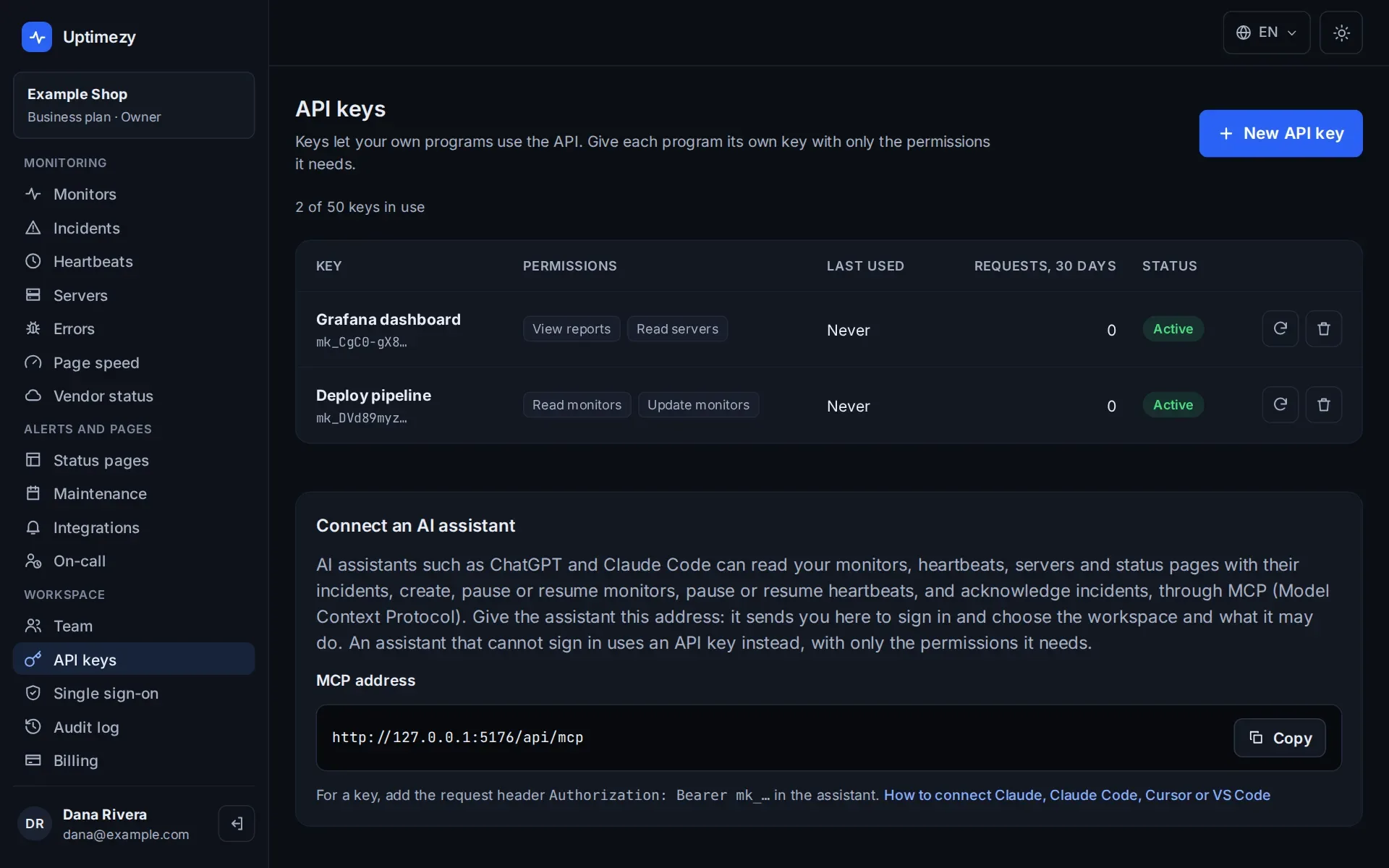
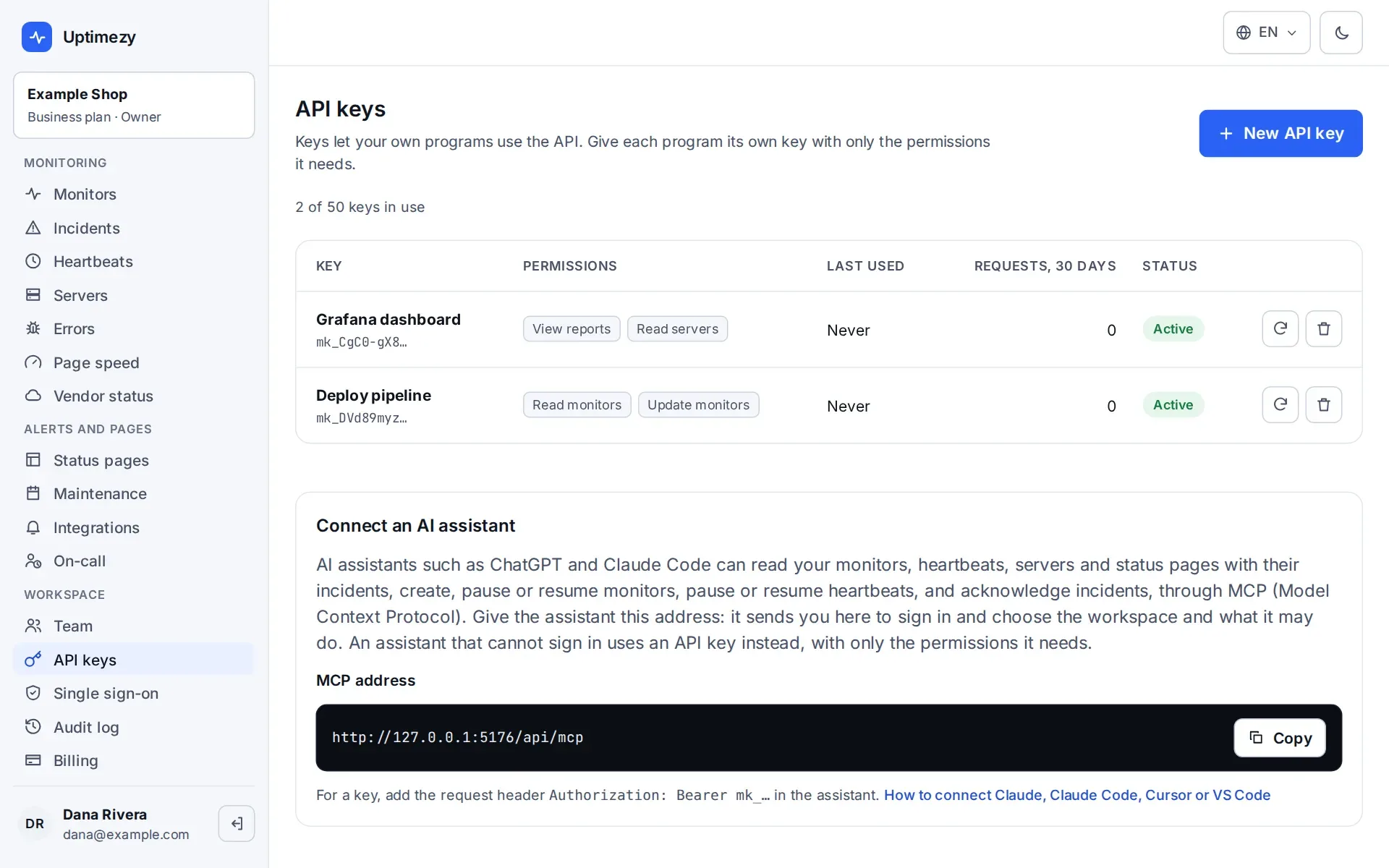
A screen from the dashboard, with example data.

The API keys page: keys with their permissions and when they were last used.The API keys page: keys with their permissions and when they were last used.

How it works

  1. Create an API key

    Choose its access level in the dashboard.

  2. Call the API

    Use any HTTP client. The API reference shows a curl command for each route.

  3. React to events

    Add a webhook URL: it receives a signed message for incidents, acknowledgements and warnings. With escalation steps, it gets incident messages only when a step names it.

The full guide

The API and webhooks, explained

Each chapter opens in place, so the page stays short.

01What a key can reach

An API key opens the routes that programs need most: monitors, reports and incidents, heartbeats, servers, status page posts and source map uploads. Everything about people, money and alert settings stays in the dashboard, where a person signs in.

Read moreShow less
AreaReadChange
MonitorsThe list, and one monitor's settings and statusCreate every type, change, pause, resume, delete
ReportsA monitor's report, statistics and response times; the incidentsAcknowledge an incident
HeartbeatsThe list, one heartbeat, their incidentsCreate, change, pause, delete, give a new address
ServersThe list, one server, metrics up to 30 days, alertsAdd, rename, tag, remove, give a new token
Status pagesPages, their incidents, planned maintenancePost incidents and updates, announce or change maintenance
Error trackingNothingUpload source maps

These stay in the dashboard: alert apps and webhooks, escalation and on-call schedules, the team, billing, the API keys themselves, status page settings and subscribers, error tracking sites, vendor status and the audit log. The API reference lists every route a key can call, with the permission it needs.
02Keys and permissions

Owners and admins create keys on API keys. Each key belongs to one workspace and carries only the permissions you tick, area by area.

Read moreShow less
  • A key starts with mk_ and is shown once. We keep only a hash of it, so nobody can read it later, not even us.
  • Permissions come per area: read, create, update and delete for monitors, heartbeats and servers; view reports; acknowledge incidents; read and post for status pages; upload for source maps.
  • A key covers the whole workspace in its areas. It cannot be limited to some monitors, and its permissions cannot be changed later.
  • The list shows the start of each key, when it was last used and its requests in the last 30 days.
  • Regenerate gives a key a new secret with the same name and permissions, and the old secret stops at once. Revoke stops a key for good.

A workspace can have 2 active keys on Free, 5 on Pro, 20 on Team, 50 on Business and 100 on Enterprise. Give each program its own key: one that leaks can then be stopped without touching the others.

03Your first requests

The API speaks JSON over HTTPS, and every address starts with /api/v1 on our API host. The first call tells your program which workspace its key belongs to.

Read moreShow less
  1. Create a key with the permission Read monitors.
  2. Call GET /api/v1/api-key with the header Authorization: Bearer mk_…. Every key may call it.
  3. Read organization_id in the answer, such as org_0192…. Every other address names it, as in /api/v1/orgs/org_…/monitors.
  4. Call GET /api/v1/orgs/org_…/monitors for the monitors and their status now.
  5. Send Content-Type: application/json with every JSON body. Source maps are the one exception: they go as multipart/form-data.

The API reference shows each route with a curl command, an example answer and the permission it needs. Any HTTP client works: there is nothing to install. IDs start with a short prefix, such as mon_ for a monitor or inc_ for an incident.

04Limits per key

Each key has its own limit of requests per minute, and the limit depends on the workspace's plan. A short burst above the steady rate is allowed.

Read moreShow less
  • Over the limit, the answer is 429 with the code rate_limited and a Retry-After header: wait that many seconds, then send again.
  • A request body can be 64 KB at most, and a source map 20 MB.
  • The plan also limits monitors, heartbeats, servers and how often checks run. A request over such a limit gets 403 with plan_limit_reached, or the field error interval_too_short.
  • Messages from an AI assistant that uses the key count against the same limit.

The requests per minute of each plan are in the API reference, and the other limits on the pricing page. Each key has its own limit, so one busy key does not use up another's. All requests from one address also share a limit of their own, so scripts on the same server can still slow each other down.

05Errors your code can rely on

Every error has a status of 400 or more and the same JSON shape. Build on its code, which never changes; the sentences are for people.

Read moreShow less
Status and codeWhat it meansWhat to do
401 invalid_api_keyNo key, a wrong key, or a revoked oneCheck the header; create a new key if it was revoked
403 insufficient_scopeThe key lacks this route's permissionUse a key that has it
404 not_foundThe ID does not exist, or it belongs to another workspaceUse IDs from this workspace's lists
422 validation_failedOne or more fields are not validRead errors: each item names its field and a code
429 rate_limitedToo many requestsWait as long as Retry-After says
500 internal_errorSomething went wrong on our sideTry again; if it stays, send us the request_id

detail and each field's message come in English, French, Spanish or German, as your Accept-Language header asks. The list of codes has the others, such as plan_limit_reached and too_many_posts.

06Reading your data out

Programs can read most of what the dashboard shows about monitors, heartbeats and servers; the routes traced for an incident and the servers' alert rules stay in the dashboard. There are no pages to walk through: a list holds everything, or the newest items up to a fixed number.

Read moreShow less
RouteWhat it gives
/monitors/mon_…/reportThe checks of the last 24 hours, at most 500, each with where it ran; the places that checked; the last 20 incidents
/monitors/mon_…/statsAvailability measured in time, as on the monitor page: the last day, week, 30 days and year, or chosen UTC days up to 400 days back, with downtime, incidents and the goal
/monitors/mon_…/responseResponse times in slots, from the last hour to 30 days, with the average, fastest, slowest and 95th percentile, for every place or one
/incidentsOpen incidents first, then the newest, at most 100
/servers/srv_…/metricsA server's CPU, memory, disk, load and network, from the last hour to 30 days

07Changing things safely

A change made with a key goes through the same checks as in the dashboard: the same validation and the same plan limits. A few answers carry a secret, and those are shown only once.

Read moreShow less
  • Monitors of every type can be created, API, database and UDP monitors too. Addresses must be public: localhost and private networks are refused.
  • A heartbeat's secret address is in the answer that creates it or gives it a new address, and never again when a key reads it.
  • A server's token and its install command are in the answer that adds it or gives it a new token, once.
  • An API monitor's header values and a database monitor's password are never shown again, not even to the key that sent them.
  • Deleting a monitor is for good. Its history is removed in the background.

Changes made with a key are written to the audit log, which shows API key and the key's ID. An incident acknowledged with a key names the key, never the person who created it. Reading the Audit log needs the Business or Enterprise plan.

08Webhooks: events pushed to you

A webhook is an address of yours that gets a POST request with a JSON body for each event that goes to it. With escalation steps, it gets an incident's events only when a step names it. Owners and admins add webhooks under Integrations, not through the API.

Read moreShow less
EventWhen it is sent
incident.opened, incident.resolvedAn incident of a monitor, a heartbeat or a server opened or ended
incident.acknowledged, incident.reminderSomeone took it, or the escalation reminds its last step
certificate.expiring, domain.expiringA monitor's certificate or domain ends soon
vendor.incident, vendor.resolvedA vendor you follow reports a problem, or its end
error.new_issue, error.regressionA new error on your site, or a resolved one that came back
  • Each message is signed: X-Monitor-Signature holds an HMAC-SHA256 of the timestamp and the raw body, made with your whsec_ secret.
  • Answer with a 2xx status within 10 seconds. Otherwise the message is tried again after 1 minute, 5 more minutes and 30 more minutes.
  • A retry keeps its X-Monitor-Delivery ID, so your code can skip one it already handled.
  • There is no filter and no custom header: your code ignores the events it does not need.

A workspace can have 2 webhooks on Free and up to 50 on Enterprise. Every message counts toward the daily message limit, and error alerts have their own daily allowance on top. The webhooks guide has code that checks the signature.

09Status pages from your programs

A key with the permission to post can tell a status page's visitors what is going on. On a published page, every post is public at once and is emailed to the page's subscribers.

Read moreShow less
  • Open an incident with its first message, post updates with a new state, and close it with the state resolved.
  • Announce planned maintenance, or change it later; a change sends no email. Moving the end into the past marks work that finished early as done.
  • Programs can post 10 times per page and hour. Over that, the answer is 429 with too_many_posts and a Retry-After header.
  • A program cannot mute alerts during maintenance, nor change maintenance that mutes them. Only a person in the dashboard can.

Page settings, logos, domains, subscribers and deleting a page stay in the dashboard, and the audit log shows the ID of the key that posted. See status pages for what visitors see.

Common questions

Is there a rate limit?

Yes, and it grows with your plan. When a key sends too fast, the answer says how long to wait.

Can I export my data?

Yes, in part. A key reads monitors, heartbeats and servers with their settings and incidents, monitor statistics, server measurements and the checks of the last 24 hours. Alert settings, such as chat apps and webhooks, cannot be read with a key.

Can a key be limited to some monitors?

No. A key's permissions are per area, such as reading monitors or deleting heartbeats, and cover the whole workspace. Give each program its own key with only the areas it needs.

Can I manage webhooks or alert apps through the API?

No. Webhooks, chat apps, escalation and the team are managed in the dashboard by owners and admins. The API reads and changes monitors, heartbeats, servers and status page posts.

What do I do when a key leaks?

Revoke it on the API keys page: it stops at once. Or regenerate it: the key gets a new secret with the same name and permissions, and the old secret stops working at once.

Can I change a key's permissions?

No. A key keeps the permissions it was created with. Create a new key with the permissions you need, move your program to it, then revoke the old one.

Is the API on the Free plan?

Yes. The Free plan has 2 keys, and paid plans have more. Each key's limit of requests per minute also grows with the plan.

More features

All features

Roles, two-step sign-in, single sign-on and an audit log.

Learn more: Team and security

Ask ChatGPT, Claude Code and others about your monitors.

Learn more: AI assistants

Add your first monitor in two minutes

Free plan. No credit card needed.