SSL certificate monitoring with expiry warnings

Every website, keyword and API check over HTTPS reads the certificate. You get a warning before it expires, and a broken certificate fails the check like any outage.

In practice

Where certificate monitoring earns its place

An expired certificate takes a site down as surely as a dead server, and browsers make sure every visitor sees it. These are the places where a warning in time pays for itself.

Renewal

When automatic renewal quietly stops

Certificates that renew by themselves can stop without a sound: a moved server, a changed DNS record or a new firewall rule, and the renewal job fails. With the default setting, the first warning comes when 14 days are left, when the renewal should have happened already. You have two weeks to fix the job, and a final warning comes when fewer than two days remain.

Agencies

Every client site in one list

An agency may look after dozens of client sites, each with its own host and certificate. Give each one a website monitor. The monitors list puts a note under every running monitor whose certificate ends within its warning days, and a site whose certificate already fails shows “Certificate or secure connection problem”. One look at the list says which client needs a renewal this week.

APIs

The API behind your mobile app

Apps refuse a certificate that has expired, so on the day your API's certificate ends, every installed copy of the app loses its connection at once. An API monitor on a health route checks the answer and reads the certificate at every check. The route can answer 200 and still be six days from that outage: the warning says so while there is time.

Migration

Moving to a new host or CDN

After a move, the new server may answer with a certificate made for another name. Browsers refuse it, and so does the check: it fails with “Certificate or secure connection problem”, is checked again, and an incident opens once the failure is confirmed. The free SSL checker then shows which names the certificate covers, so you know what to fix.

Bought certificates

Certificates you buy once a year

A certificate bought from an authority by hand needs an order, a check of your domain and an install, and each step can wait on someone else. Set the monitor's “Certificate warning” to 30 days, so there is time for all three. The monitor page shows who issued the certificate and when it started, so you know which one to renew.

Automation

Warnings in your ticket system

Warnings also reach the workspace's webhooks, as the event certificate.expiring with the end date and the days left. A small receiver can open a ticket for whoever owns the certificate, so the renewal is tracked. Each stage is sent once per end date. If the setting stays the same, a monitor opens two tickets for one certificate: one at the first warning, one at the final one.

What is included

Warnings before it expires

30, 14 or 7 days before the end, 14 by default, and once more when less than two days are left. Or switch them off.

A broken certificate is an outage

An expired, untrusted or wrong-name certificate fails the check, as a browser would refuse it, and an incident opens like for any failure.

The certificate visitors get

We read the certificate of the final page, after redirects.

Issuer and dates

The monitor page shows who issued the certificate, when it started and when it ends.

Renewed? It starts over

When the certificate is renewed, the warnings start over for its new end date.

No extra monitor

Warnings come with every HTTPS website, keyword and API monitor, on every plan.

In the dashboard

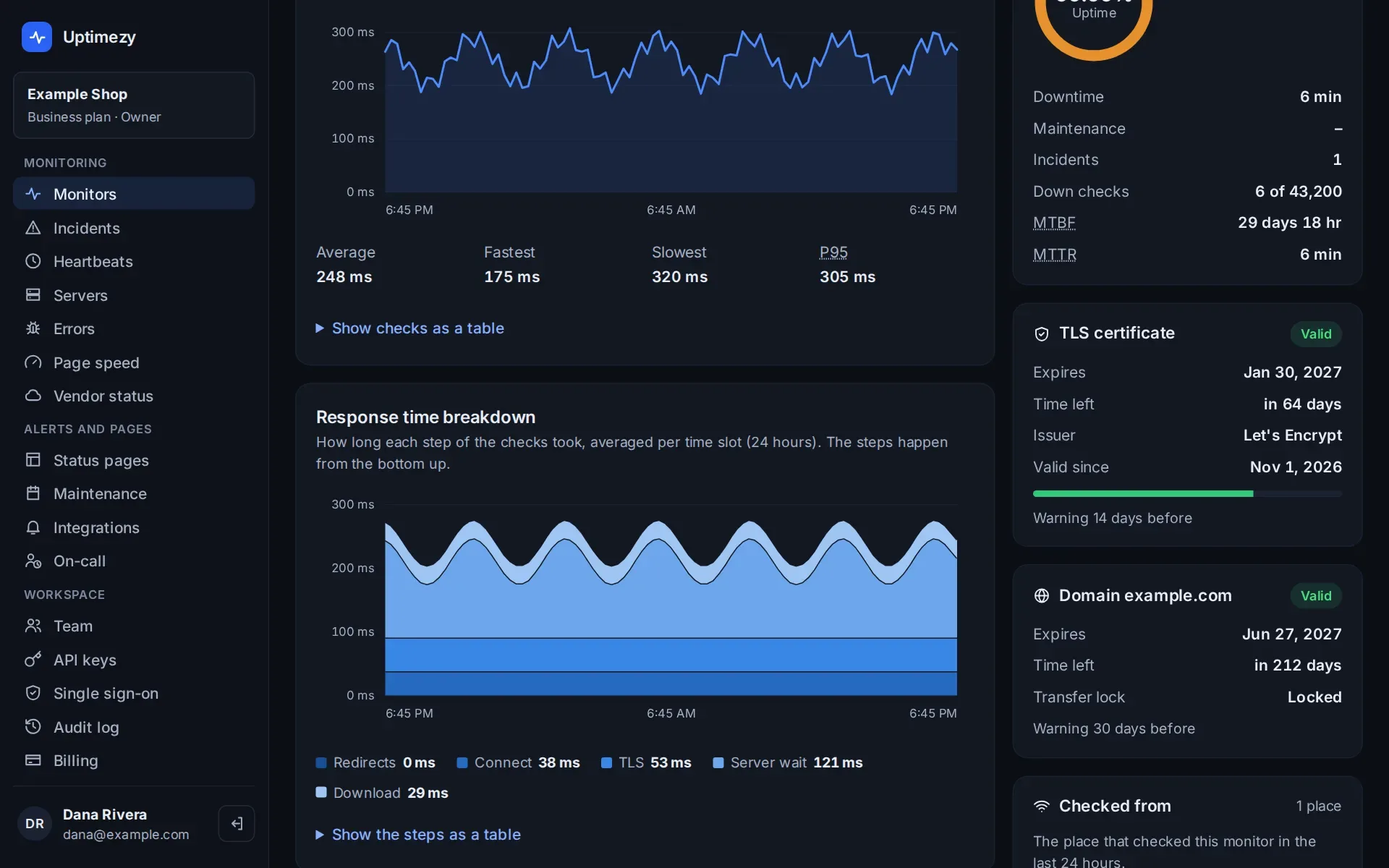
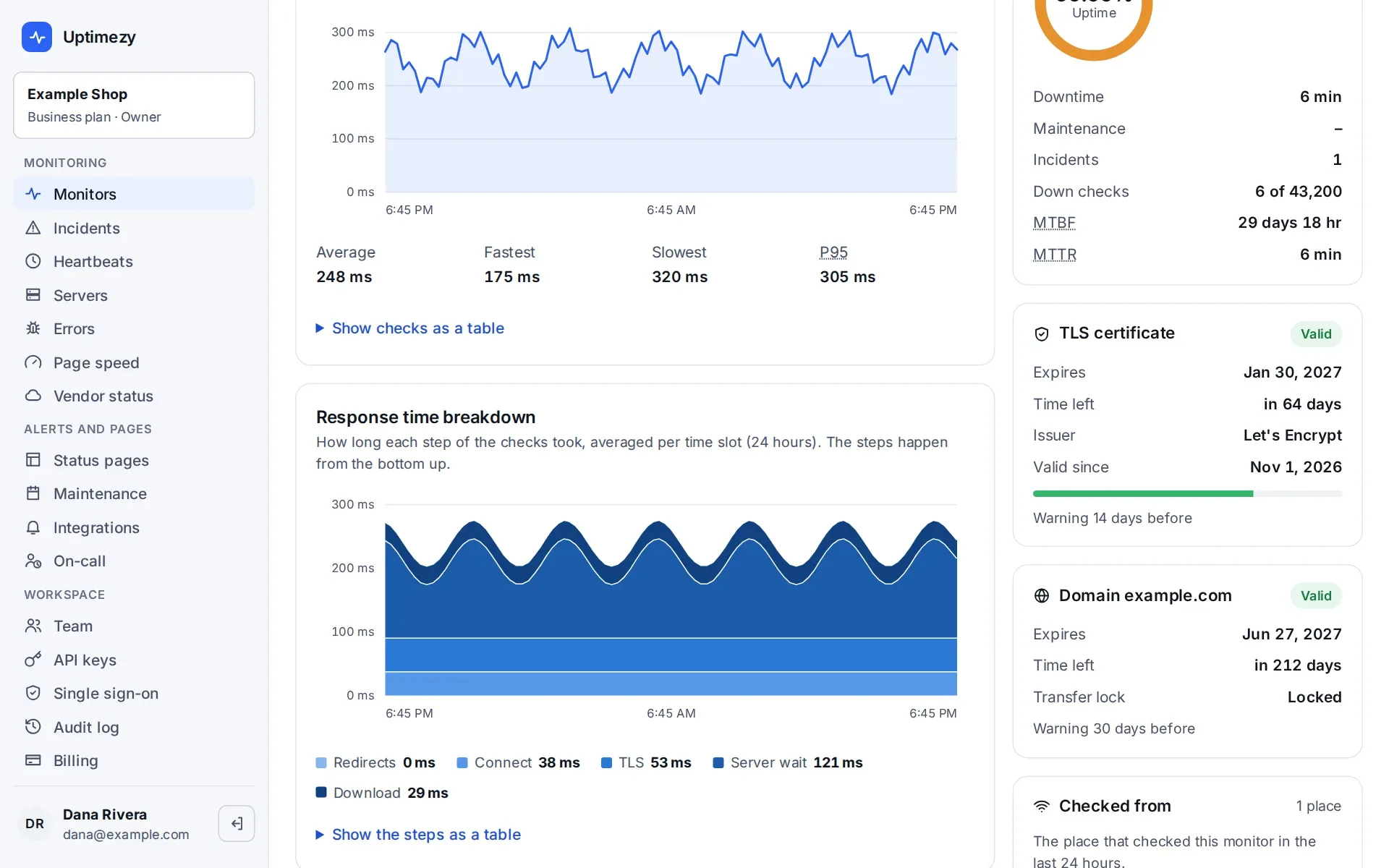
A screen from the dashboard, with example data.

A monitor's certificate and domain: who issued the certificate, when it ends, and when the domain expires.A monitor's certificate and domain: who issued the certificate, when it ends, and when the domain expires.

How it works

  1. Step 1

    Add an HTTPS monitor

    A website, keyword or API monitor.

  2. Step 2

    Choose when to hear

    30, 14 or 7 days before the end.

  3. Step 3

    Renew in time

    The warning reaches your alert channels, and once more when less than two days are left.

The full guide

SSL certificate monitoring, explained

Eight chapters on what a check verifies, when warnings come and what a monitor cannot see. Each one opens in place.

01What a check verifies

Every check of a website, keyword or API monitor on an https address makes a TLS handshake first. Before any status code is read, the certificate must be in date, made for the right name and chained to a trusted authority. When it is not, the check fails like for any other outage.

Read moreShow less
The certificateWhat the check does
In date, for the right name, from a trusted authorityGoes on to the status code, and keeps the end date and the issuer
Expired, or not valid yetFails with “Certificate or secure connection problem”
Made for another nameFails with “Certificate or secure connection problem”
Self-signed, or without a chain to a trusted authorityFails with “Certificate or secure connection problem”

A missing intermediate certificate is a common cause of the last row. Some browsers fetch the missing piece by themselves, so the site opens for you. Our check uses only the certificates the server sends, as many apps do, and fails.

02Which certificate is read

A check keeps one certificate: the server's own certificate of the last page it reached. That is the one your visitors' browsers get.

Read moreShow less
  • After redirects. A website or keyword monitor on http://example.com that is sent on to https://www.example.com reads the certificate of www.example.com. An API monitor follows a redirect only on the same host.
  • Whatever the status code. A page that answers 503 still has its certificate read, so a warning can come while the site is down for another reason.
  • From the address the public reaches. When a CDN or a proxy sits in front of your server, the check sees the certificate the CDN shows, not the one on your server behind it.
  • On plain http without a redirect, there is no certificate to read, and the card on the monitor page shows Unknown.
  • When a check fails before an answer comes, the date known before is kept.

Only website, keyword and API monitors keep a certificate's dates and warn before it ends. Port, ping, DNS and UDP monitors never look at a certificate, even on port 443. Database monitors check the certificate when they connect, but keep no dates and send no warning.
03When the warnings come

Each monitor has its own Certificate warning: 7, 14 or 30 days before the end, or No warning. New monitors start at 14 days, because a certificate that renews by itself should have renewed by then.

Read moreShow less
  • The first warning comes with the first check that finds the end date within your setting.
  • A final warning comes when fewer than two days are left.
  • Each one is sent once for an end date. When the certificate is renewed, the next check reads the new end date and the count starts again.
  • After the end date, no more warnings come: the check itself fails, and that opens an incident.
  • A paused monitor makes no checks, so it sends no warnings.

The setting is on the monitor's form in the dashboard, and in cert_expiry_days through the API. The website monitoring guide shows where it sits in the form.

04Where a warning goes

A warning is not an incident: nothing is down yet. It goes at once to everyone who gets alerts, without escalation steps.

Read moreShow less
  • By email to every member who has alert emails on, with the address, the end date and the days left.
  • To every chat channel of the workspace, such as Slack or Microsoft Teams.
  • To every webhook, as the event certificate.expiring with an expiry object: kind, expires_at and days_left. See Webhooks.

Each message counts toward your plan's daily messages, such as 100 on Free or 500 on Pro. On a day the limit is reached, a warning can be dropped; the delivery log shows it.

05When the certificate is already broken

A warning comes before the end. Once a certificate has ended, or a server answers with a bad one, the check fails and the usual path of an outage begins.

Read moreShow less
  1. The check fails with “Certificate or secure connection problem”.
  2. It is checked again from the same place, 30 seconds later, or at the next check when your interval is shorter.
  3. If it fails again, up to two of the other places we run checks from check at the same moment, and most must agree.
  4. An incident opens and your alerts go out, through your escalation steps if you set them.
  5. When a check passes again and that is confirmed, the incident ends and a recovery message follows.

Once the end date has passed, the TLS certificate card shows Ended. The card keeps the last certificate a check could read, so after a move to a server with a wrong certificate it may still show the old one as valid. The incident's reason is what counts, and the SSL checker tells you more.

06Reading the certificate card

Each website, keyword and API monitor has a TLS certificate card on its page. It shows the last certificate a check over HTTPS could read, and when you will hear about it.

Read moreShow less
LineWhat it means
ExpiresThe day the certificate ends
Time leftHow long is left until then
IssuerThe authority that issued it, as it names itself
Valid sinceThe day it started, which changes at every renewal
  • Valid: the end date is further away than your warning setting, or the warning is off and the end date has not passed.
  • Ends soon: the end date is within your warning setting.
  • Ended: the end date has passed.
  • Unknown: no check over HTTPS has read a certificate yet.

A bar under the facts shows how much of the certificate's life is left, and the last line repeats your warning setting. In the monitors list, a note appears under every monitor that is not paused and whose certificate ends within its warning days. The API gives the same facts as cert_expires_at, cert_issuer and cert_valid_from.

07Checking once, or watching all the time

The free SSL checker and a monitor answer different questions. The checker says what is wrong with a certificate right now; a monitor tells you before it ends, and when it breaks.

Read moreShow less
Free SSL checkerA monitor
When it runsWhen you askAt every check, day and night
What it showsIssuer, names, chain, TLS version and every problem by nameIssuer, start and end dates, and whether the check passed
Which portsAny port that speaks TLS from the start, such as mail.example.com:993Web ports: 443, 80, or 1024 and up
Who hearsYou, on the pageYour alert emails, chats and webhooks
What is keptNothing, after a short whileThe last certificate on the monitor page, and every incident

Use the checker before you add a monitor and after a failure, and the monitor for the months in between.

08What certificate monitoring does not cover

A monitor reads the certificate of a web page. A few things sit outside that, and it is better to know them before you rely on it.

Read moreShow less
  • Mail and other services on low ports. Ports such as 993 or 465 cannot be used by a website monitor, and a port monitor only opens a connection. Check those certificates by hand with the SSL checker.
  • Revocation. A certificate that its authority revoked but that is still in date passes the check.
  • Intermediate certificates have no warning of their own. If one ends before your certificate does, the check fails with “Certificate or secure connection problem” without a warning first.
  • Changes and renewals send no message. The card shows the new dates after the next check.
  • Database monitors always encrypt and can accept a self-signed certificate, but they have no certificate warning.
  • Private addresses cannot be checked: the host must be reachable from the internet.

Common questions

Where do warnings go?

To your workspace's alert channels. They are warnings, not incidents.

Can a monitor accept a self-signed certificate?

Not a website monitor: a certificate a browser would refuse counts as a failure. Database monitors can accept a self-signed certificate.

Can I watch a certificate on a port other than 443?

A website monitor can use port 80, 443 or any port from 1024 up, such as 8443, and reads the certificate there. The certificates of mail ports such as 993 or 465 cannot be monitored; the free SSL checker checks them once when you ask.

I renewed the certificate. Do I need to do anything?

No. The next check reads the new end date, the monitor page shows it, and warnings start again for that date. The renewal itself sends no message.

My site opens in my browser, but the check fails. Why?

If the reason is “Certificate or secure connection problem”, a common cause is a server that does not send its intermediate certificate. Some browsers find it anyway; our check, like many apps, uses only what the server sends. The free SSL checker shows the chain the server sent and names the problem.

Do several monitors on one certificate each send a warning?

Yes. Each monitor reads the certificate and warns on its own, and each message counts toward your daily messages. Turn the warning off on the monitors that do not need it.

More features

All features

Never lose a domain to a missed renewal.

Learn more: Domain expiry monitoring

From the first failure to the all-clear.

Learn more: Incident management

The right person, on the right channel.

Learn more: Alerts and escalation

Add your first monitor in two minutes

Free plan. No credit card needed.